





Custom AI Providers (Bring Your Own Model)
Custom AI Providers enable a Bring Your Own Model (BYOM) approach, allowing you to connect your own large language model (LLM) backend to Cribl AI features. This gives you the flexibility to route supported Cribl AI capabilities through your preferred AI infrastructure instead of using the default Cribl-managed backend.
Why Use Custom AI Providers?
In commercial Cribl.Cloud and on-prem deployments, Cribl-managed AI features use models selected and operated by Cribl by default, with traffic following Cribl-managed routes and service contracts.
In Cribl.Cloud Government, Cribl-managed models are never available. A Custom AI Provider is required to power Cribl AI. See AI in Cribl.Cloud Government.
While this default configuration is secure, many enterprises require deeper levels of control. Custom AI providers allow you to replace the default backend with your own approved AI vendors, ensuring that your keys, models, and traffic stay within your existing cloud governance boundaries.
Integrating your own AI backend provides the following key benefits for your deployment:
- Vendor standardization: Use the AI providers your Organization has already vetted and standardized on.
- Data privacy and compliance: Keep AI traffic within specific regulatory or contractual boundaries. This is essential for organizations with strict data residency requirements or those operating in highly regulated industries.
- Direct governance: Maintain full control over your API keys and the specific model versions used for inference.
- Cost management: Gain direct visibility into how AI inference is billed. By using your own provider contracts, you can apply existing cloud credits and committed spend to your Cribl AI usage.
How Custom AI Providers Work
Custom AI providers add a configurable backend to the existing Cribl AI architecture. When a custom AI provider is enabled, Cribl AI routes all supported agentic workflows through your self-managed models (such as Anthropic or OpenAI) instead of the default Cribl-managed backend.
When a custom AI provider is active, all Cribl AI features that are supported in your deployment route through your configured provider. The Cribl-managed backend is not used as a fallback for individual capabilities.
The Deep tier accepts multiple model IDs. The first model in the list is used by default by all features that route through the Deep tier. See Model IDs and Feature Routing for details.
Main Components
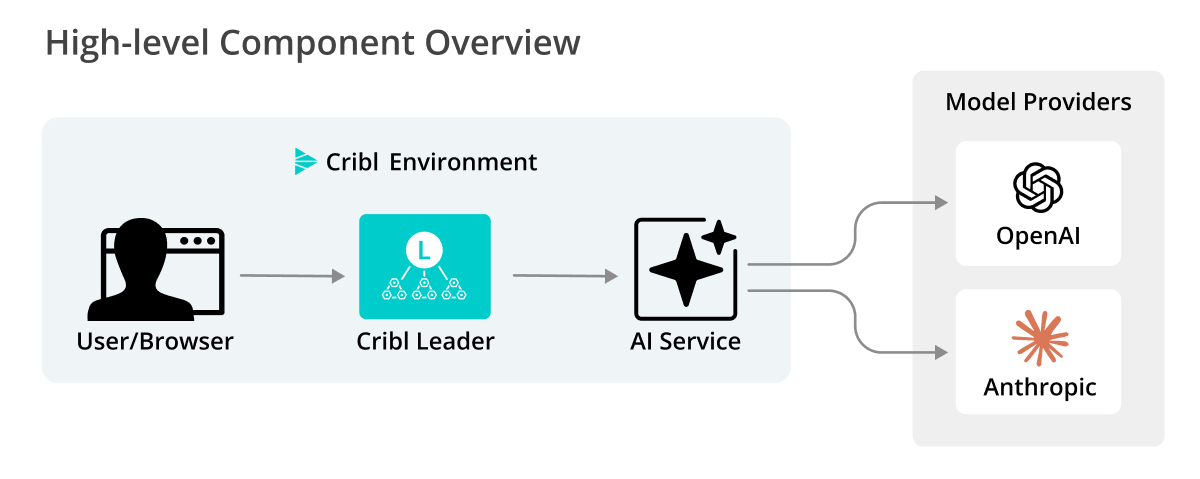
The following core components of the custom AI provider feature work together to route and process AI requests within your managed environment:
- Cribl Leader Node: The Leader Node serves the UI and API. All AI requests initiated in the UI are first received by the Leader.
- AI service: A service running on the Leader Node that manages AI agents. When a custom AI provider is enabled, it calls your configured AI provider directly using your stored credentials for all supported Cribl AI features.
Example Workflow
When you plug in a custom AI provider, you are essentially replacing the “brain” behind Cribl AI features. Once you configure it in AI Settings, the Cribl Leader Node stops sending requests to the default Cribl model provider and instead sends them directly to your hosted model.
To see this in practice, consider the KQL assistant in Cribl Search. Without needing to know Kusto Query Language, an analyst can use your custom LLM to investigate data.
Natural language input: An analyst types, “Show me the top 10 source IPs with the most failed login attempts in the last hour” into the Billy search box.
Custom inference: Cribl sends this request to your configured provider (such as Anthropic or OpenAI).
KQL generation: Your LLM processes the request and returns the specific KQL syntax:
dataset="auth_logs" | where status=="failure" | summarize count() by src_ip | top 10 by count_Execution: Cribl Search executes the query in KQL syntax against your data.
Supported Custom AI Providers and Features
Review the following sections for details on currently supported custom AI providers and the specific Cribl AI features they power.
Supported providers currently include:
- Anthropic via Amazon Bedrock
- OpenAI via Microsoft Foundry
- Google Gemini
- LiteLLM
- OpenAI-compatible endpoints
Cribl is committed to an agnostic AI strategy. The framework is designed to expand to additional model families and providers in future releases.
Deployment Limitations
Before configuring a custom AI provider, note the following constraints:
- Single provider scope: You can configure only one custom AI provider per Workspace (in Cribl.Cloud) or Global setting (on-prem).
- Workspace and Organization isolation: Custom AI provider configuration is scoped to the Workspace (in Cribl.Cloud) or Global setting (on-prem) where you create it. Settings and credentials do not propagate to other Workspaces or Organizations, and Cribl AI in one Workspace never routes requests through a provider configured in another Workspace.
- Required in Cribl.Cloud Government: In Cribl.Cloud Government, a custom AI provider is the only way to power LLM-backed Cribl AI features. Cribl-managed models are never available, and you cannot switch back to them after configuring a provider. Deleting your provider makes those features non-operational rather than falling back to Cribl-managed models. See AI in Cribl.Cloud Government.
- Inference only: Custom AI providers are used for inference only. Fine-tuned or custom-trained models are not supported at this time.
Model IDs and Feature Routing
When you enable a custom AI provider, Cribl AI agents send requests to your LLM endpoint using the model IDs you assign during provider setup. You configure models for three tiers (Fast, Balanced, and Deep) in the third step of the configuration wizard. The Fast and Balanced tiers each take a single model ID. The Deep tier accepts one or more model IDs.
At a high level, Cribl groups models into three categories:
- Fast models - Used for lightweight tasks such as:
- KQL explanation
- Search result analysis
- Ruleset selection in Guard
- Balanced models - Used for more complex, multi-step agents such as:
- Git commit message suggestions
- Notebook summaries
- Guard rule generation
- KQL investigations and follow-up workflows
- Deep models - Used when agents need extended reasoning and long-running context, such as:
- Local Cribl Search assistance over your own datasets
- Complex KQL assistant scenarios
- Cribl Search investigations
Deep Tier: Multiple Models and Per-Feature Selection
Multiple Cribl AI features use the Deep tier (see the Deep models bullet under Model IDs and Feature Routing). For all of these features, the first model in the configured Deep list is used by default. There is no UI control to switch models on a per-call basis for most Deep-tier features.
Cribl Search investigations is the exception. Investigation runs can use any of the Deep-tier models you configured for your custom provider, not just the first or default model:
- Admin (provider setup): When configuring the BYOM provider, an admin selects one or more model IDs for the Deep tier in the configuration wizard. This is the pool of Deep models available to Search investigations.
- User (per investigation): When starting or running an investigation, the user can pick which of the admin-configured Deep-tier models to use for that investigation, using a model selector that appears in the Search investigations UI.
The selector is only shown when two or more Deep-tier model IDs are configured. When only one Deep-tier model is configured, the selector is hidden and investigations use that single model.
To make multiple Deep models available to Search investigations users, configure two or more Deep model IDs in the provider setup wizard.
Microsoft Foundry and Google Gemini: When you configure one of these providers, the setup wizard offers a drop-down of supported model IDs with suggested defaults pre-filled for each tier. Your selections are restricted to the models Cribl validates for that provider.
Amazon Bedrock: The setup wizard pre-fills suggested defaults for each tier and lets you enter model IDs as text. Cribl accepts only supported Claude models, and accepts them with any geographic inference profile prefix, such as au. or eu.. See Use Region-Prefixed Model IDs.
LiteLLM and OpenAI-compatible: The setup wizard does not restrict model selection. You enter any model ID your endpoint accepts. Your endpoint must be able to handle every model ID you specify, even if you internally route them to a smaller set of physical deployments.
For the specific model IDs available and suggested per provider, see:
- Anthropic via Amazon Bedrock model IDs
- OpenAI via Microsoft Foundry model IDs
- Google Gemini model IDs
- LiteLLM model IDs
- OpenAI-compatible model IDs
Token Limits
Cribl uses hardcoded token limits to manage context windows for each model. These limits determine how much context (prompt plus response) can be used in a single request:
| Model ID | Token Limit |
|---|---|
gpt-4o | 123,000 |
gpt-4.1 | 123,000 |
gpt-4.1-mini | 123,000 |
gpt-4.1-nano | 123,000 |
o4-mini | 123,000 |
gpt-5.1 | 400,000 |
gpt-5.2 | 400,000 |
gpt-5.4 | 200,000 |
gpt-5.5 | 400,000 |
gpt-5.6-luna | 900,000 |
gpt-5.6-sol | 900,000 |
gpt-5.6-terra | 900,000 |
us.anthropic.claude-opus-4-7 | 400,000 |
us.anthropic.claude-opus-4-8 | 400,000 |
For all supported Google Gemini models, in both the 2.5 and 3.x families, Cribl uses a limit of 1,048,576 tokens.
For Anthropic models via Amazon Bedrock, Cribl applies the token limit listed for the equivalent us. model ID to each region-prefixed version of that model. For example, au.anthropic.claude-opus-4-8 has a per-request limit of 400,000 tokens, the same as us.anthropic.claude-opus-4-8. These model IDs do not share a single token limit across regions. See Use Region-Prefixed Model IDs.
For all other models, including Anthropic models via Amazon Bedrock that are not listed above, Cribl uses a default limit of 123,000 tokens.
Cribl does not query your endpoint for context-window sizes. These hardcoded limits are used regardless of what your backend reports. If your deployment has lower limits, you may see truncation or errors on large prompts.
Supported Cribl AI Features
When a custom AI provider is active, all supported Cribl AI features route through your managed LLM. This includes:
- Billy chat experiences: The in-product chatbot, the Cribl Docs assistant, and the Slack community app.
- Pipeline Builder in Cribl Stream: Log-type detection, schema suggestions, and AI-assisted Pipeline editing.
- KQL assistant: Translating natural language into Kusto Query Language (KQL) in Cribl Search.
- Cribl Search suggestions: Generating query refinements or follow-up suggestions in the Search bar.
- Local Cribl Search assistance: Translating natural-language descriptions into queries against local data Sources.
- Dataset Intelligence: Generating AI-powered reference files for Datasets to improve investigation and query accuracy.
- Cribl Search investigations: Running interactive, AI-assisted investigations. Uses the Deep tier and supports a per-investigation model selector when multiple Deep models are configured.
- Visualizations: Natural-language suggestions that drive “Visualize this dataset” flows in Cribl Search.
- Notebook summaries: Generating natural-language explanations of Search Notebook logic and findings.
- Guard rule generation: Drafting or refining detection rules in Cribl Guard.
- Analyze detections: Summarizing and contextualizing Cribl Guard background-detection findings with an LLM.
- Git commit messages: Suggesting descriptive summaries when saving or committing configuration changes.
Feature availability also depends on your deployment type. See Feature Availability on the Cribl AI overview for the full list of features supported in on-prem and Cribl.Cloud deployments.
Background detection is not affected by BYOM. Background detection runs locally using regex rules and a specialized named-entity-recognition (NER) model. It does not use an LLM and does not route through your custom AI provider. The detection model selector in the Guard header picks a local NER detection bundle, not an LLM. The downstream Analyze detections workflow does use an LLM and is covered by your custom provider configuration.