





Cribl API
The Cribl API is a RESTful API that provides a centrally managed control plane for programmatically configuring and managing Cribl resources. Developers can use the API to:
- Retrieve and manage data.
- Automate repetitive manual processes.
- Integrate with third-party applications.
- Consistently replicate environments and resources for testing, development, and deployment.
The Cribl API generally follows a resource-based structure in which each endpoint corresponds with a specific Cribl resource or collection of resources. In request URLs, resource-specific paths branch off from the base URL.
Read the Authentication page to learn how to authenticate to the Cribl API.
About PATCH Requests
In the Cribl API for the control plane, PATCH requests require a complete representation of the resource that you want to update. Endpoints that use the PATCH method do not support partial updates. Cribl removes any omitted fields when updating the resource. If you use a GET request to retrieve an existing configuration to use in the body of a PATCH request, confirm that the configuration is correct. If the existing configuration is incorrect, the updated resource may not function as expected. The Update Configurations example demonstrates how to update a Destination using the PATCH method.
The Cribl API for the management plane does support partial updates for endpoints that use the PATCH method.
Try It Out
The API Reference is also available in Cribl at Settings > Global > API Reference. We recommend using the in-product API Reference because it features a Try it out button for each endpoint that you can use to construct and execute a curl command and examine the response. The in-product API Reference aligns with your environment and provides a seamless testing experience.
At the top of the in-product API Reference, a Servers drop-down menu lists the base URLs associated with your Stream Leader and Worker Groups, Edge Fleets, and Search instance. Try it out commands use the base URL that you select from the Servers drop-down menu. The default selection in the Servers drop-down is the base URL for your Leader.
Base URLs
The base URL is the root address for making requests to the Cribl API. The standardized base URL format provides a consistent, predictable pattern.
Follow the format examples in this section to construct the base URL for your Cribl deployment. The correct base URL depends first on whether the target endpoint is in the control plane or management plane. For control plane endpoints, the base URL further depends on whether the target endpoint operates in the global, Group/Fleet or Host, or Cribl Search context.
In hybrid deployments with a Cribl.Cloud Leader and on-prem workers, API requests use the Cribl.Cloud base URL format. This is true even in the Group/Fleet or Host context because API requests are served from the Cribl.Cloud Leader.
To compose the complete URL for a request to a specific endpoint, append the endpoint path that is listed in the API Reference to the base URL.
Control Plane Base URLs
The control plane provides operational control over Cribl resources. The control plane is supported for Cribl.Cloud/hybrid and on-prem deployments, and the base URL varies for target endpoints in the global, Group/Fleet or Host, or Cribl Search context.
Global Context
For API requests to endpoints that apply to the entire Workspace or Organization (Cribl.Cloud/hybrid) or instance (on-prem), use the base URL for global requests. Examples of requests with a global scope include managing feature settings and resources outside of the context of a specific Worker Group or Fleet.
In Cribl.Cloud and hybrid deployments, the base URL format for global requests for Cribl Stream, Edge, and Lake endpoints is:
https://${workspaceName}-${organizationId}.cribl.cloud/api/v1In Cribl.Cloud Government and hybrid deployments, the format is the same except the hostname uses cribl-gov.cloud:
https://${workspaceName}-${organizationId}.cribl-gov.cloud/api/v1For single-instance on-prem deployments, use the following base URL format for global requests:
https://${hostname}:${port}/api/v1For example, to send a request to the GET /system/settings/git-settings endpoint to retrieve the git settings for the Organization or instance, the complete URL is:
https://${workspaceName}-${organizationId}.cribl.cloud/api/v1/system/settings/git-settingshttps://${workspaceName}-${organizationId}.cribl-gov.cloud/api/v1/system/settings/git-settingshttps://${hostname}:${port}/api/v1/system/settings/git-settingsGroup/Fleet or Host Context
Some endpoints operate in the context of a specific Worker Group or Edge Fleet or host (Worker or Edge Node). In these cases, the base URL format includes additional URL segments that identify the context and the particular Group/Fleet or Node.
| Context | URL Segments | Example |
|---|---|---|
| Endpoints that target a specific Group/Fleet | /m/${groupName} | List the commit history for a Worker Group or Edge Fleet with GET /version |
| Endpoints that act on a single Worker or Edge Node | /w/${nodeId} | Get host metadata with GET /edge/metadata |
Base URL for the Group or Fleet Context
For requests that are specific to a Worker Group or Edge Fleet, the base URL includes the /m context indicator and the name of the target Worker Group or Fleet:
https://${workspaceName}-${organizationId}.cribl.cloud/api/v1/m/${groupName}https://${workspaceName}-${organizationId}.cribl-gov.cloud/api/v1/m/${groupName}https://${hostname}:${port}/api/v1/m/${groupName}If your license is limited to a single Worker Group, the
groupNameis alwaysdefault.
For example, to send a request to the POST /system/outputs endpoint to create a Destination for the Worker Group myDevGroup, the complete URL is:
https://${workspaceName}-${organizationId}.cribl.cloud/api/v1/m/myDevGroup/system/outputshttps://${workspaceName}-${organizationId}.cribl-gov.cloud/api/v1/m/myDevGroup/system/outputshttps://${hostname}:${port}/api/v1/m/myDevGroup/system/outputsBase URL for the Host Context
For requests that are specific to a certain host (Worker or Edge Node), the base URL includes the /w context indicator and the ID of the target Worker or Edge Node:
https://${workspaceName}-${organizationId}.cribl.cloud/api/v1/w/${nodeId}https://${workspaceName}-${organizationId}.cribl-gov.cloud/api/v1/w/${nodeId}https://${hostname}:${port}/api/v1/w/${nodeId}To get the nodeId, send a request to the GET /products/{product}/workers endpoint using the global context for the base URL. The response lists detailed metadata for all Worker and Edge Nodes that the Leader manages. Use the id value for the desired Node as the nodeId in the request URL.
For example, to send a request to the GET /health endpoint for the Worker Node abc123a9-ea69-4066-b295-456defb55784, the complete URL is:
https://${workspaceName}-${organizationId}.cribl.cloud/api/v1/w/abc123a9-ea69-4066-b295-456defb55784/healthhttps://${workspaceName}-${organizationId}.cribl-gov.cloud/api/v1/w/abc123a9-ea69-4066-b295-456defb55784/healthhttps://${hostname}:${port}/api/v1/w/abc123a9-ea69-4066-b295-456defb55784/healthCribl Search Context
For Cribl Search endpoints, the base URL includes /m and default_search:
https://${workspaceName}-${organizationId}.cribl.cloud/api/v1/m/default_searchhttps://${workspaceName}-${organizationId}.cribl-gov.cloud/api/v1/m/default_searchFor example, for a request to the GET /search/jobs/{id} endpoint, the complete URL is:
https://${workspaceName}-${organizationId}.cribl.cloud/api/v1/m/default_search/search/jobs/{id}https://${workspaceName}-${organizationId}.cribl-gov.cloud/api/v1/m/default_search/search/jobs/{id}Management Plane Base URL
The management plane includes endpoints for administrative tasks like configuring and managing Workspaces. The management plane is supported for commercial Cribl.Cloud only.
Cribl.Cloud Government does not support the management plane API.
For management plane endpoints, the base URL is:
https://gateway.cribl.cloudFor example, for a request to the GET /v1/organizations/{organizationId}/workspaces endpoint, the complete URL is:
https://gateway.cribl.cloud/v1/organizations/${organizationId}/workspacesPath Parameters
Many Cribl API endpoints require to you provide path parameters. Most path parameters are used to specify individual resources. For example, in the endpoint GET /pack/{id}, the {id} identifies the specific Cribl Pack to retrieve.
For some endpoints, path parameters limit the scope of the request in some way. For example, in the endpoint GET /products/{product}/groups, the {product} path parameter indicates the Cribl product whose Worker Groups or Edge Fleets should be listed in the response. In another example, GET /p/{pack}/pipelines, the {pack} path parameter limits the response to Pipelines within the specified Pack.
The API Reference identifies and describes the path parameters for each endpoint.
Query Parameters
Some Cribl API endpoints support optional query parameters for filtering or modifying the response. For example, endpoints that return a list of objects can have lengthy responses, so they might support limit and offset query parameters to use for paginating the response. Other endpoints might support query parameters that allow you to specify additional properties to include in the response or a JavaScript expression to apply as a filter.
The API Reference identifies and describes the supported query parameters for each endpoint.
Request Size Limit
The size limit for requests to the Cribl API is 5 MB.
Rate Limits
Cribl applies rate limits for API requests so that excessive traffic does not interfere with normal operations. The rate limits vary for different Cribl API endpoints. You can directly change rate limits for only the login and SSO/SLO callback endpoints.
When a request exceeds an endpoint’s rate limit, the API returns HTTP status code 429 Too Many Requests and a Retry-After response header. The Retry-After header value is the number of seconds to wait before retrying the request. The response body includes the limiter attribute, which identifies the rate limit that the request exceeded.
In Cribl.Cloud, if a rate limit repeatedly prevents requests, contact Cribl Support to request an adjustment at the Organization or Workspace level. Provide the
limitervalue from the429 Too Many Requestsresponse body with your adjustment request.
Each Leader or Node tracks its own rate limits. Requests from all clients to the same Leader or Node count toward the same rate limit.
Rate Limits for Login and SSO/SLO Endpoints
You can change the default rate limits for the following on-prem API endpoints:
Endpoints | Purpose | Default Rate Limit |
|---|---|---|
POST /auth/login | Log in and get a Bearer token to authenticate subsequent API requests. | Two requests per second |
GET /auth/sso/callbackPOST /auth/sso/callbackGET /auth/slo/callbackPOST /auth/slo/callback | Receive and process SAML sign-in and sign-out responses from the identity provider. All four endpoints share the rate limit. | Two requests per second |
Updated limits take effect without restarting the affected Leader or Node.
To change rate limits for the login and SSO/SLO endpoints with the API, use PATCH /system/api-limits. The following example demonstrates how to increase the rate limits for the login and SSO/SLO endpoints from 2 requests per second to 10 requests per second:
- For the login endpoint, use the
rateLimits.login.rateandrateLimits.login.intervalbody parameters. - For the SSO/SLO endpoints, use the
rateLimits.sso.rateandrateLimits.sso.intervalbody parameters.
curl --request PATCH \
--url "https://${hostname}:${port}/api/v1/system/api-limits" \
--header "Authorization: Bearer ${token}" \
--header "Content-Type: application/json" \
--data '{
  "rateLimits": {
    "login": {
      "rate": 10,
      "interval": "second"
    },
    "sso": {
      "rate": 10,
      "interval": "second"
    }
  }
}'You can also use the Cribl UI or the api-limits.yml configuration file to change the rate limits for these endpoints:
In the Cribl UI, set the Login rate limit and SSO/SLO callback rate limit for the Leader, Worker Group, or Edge Fleet.
In the
api-limits.ymlconfiguration file, setrateLimits.loginandrateLimits.sso.
Media Types
For endpoints that require a request body (typically POST, PUT, and PATCH), the server expects a valid Content-Type request header that specifies the media type of the request body. In this example request, the Content-Type value is application/json:
curl --request POST \
--url "https://${workspaceName}-${organizationId}.cribl.cloud/api/v1/m/default_search/search/jobs" \
--header "Authorization: Bearer ${token}" \
--header "Content-Type: application/json" \
--data '{
  "query": "cribl dataset=\"goatherd_sample_dataset\" | limit 1000",
  "earliest": "-1h",
  "latest": "now",
  "sampleRate": 1
}'If the request omits the Content-Type header or the value does not match the supported media type for the endpoint, the server might return an error.
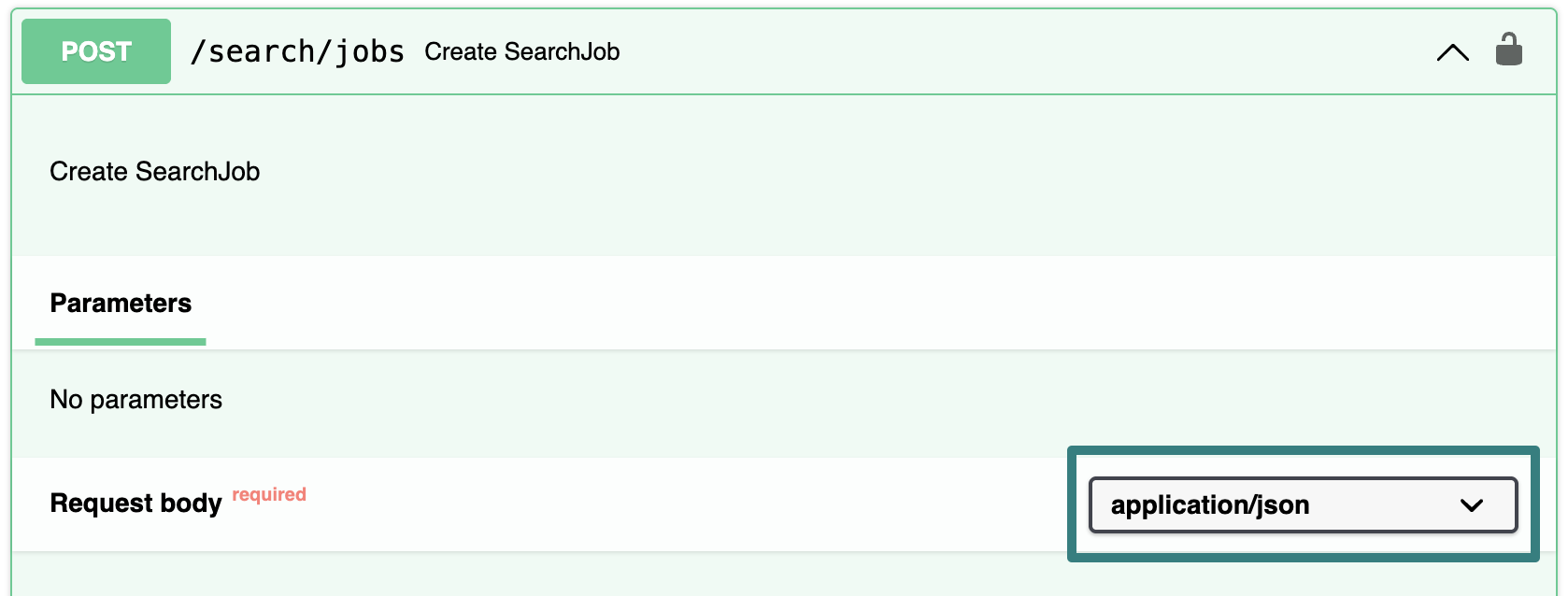
For most POST, PUT, and PATCH endpoints in the Cribl API, the media type for the request body is application/json. Some endpoints support other media types, such as application/x-ndjson or application/x-www-form-urlencoded. The API Reference specifies the supported media type for each endpoint in the Request body drop-down list.
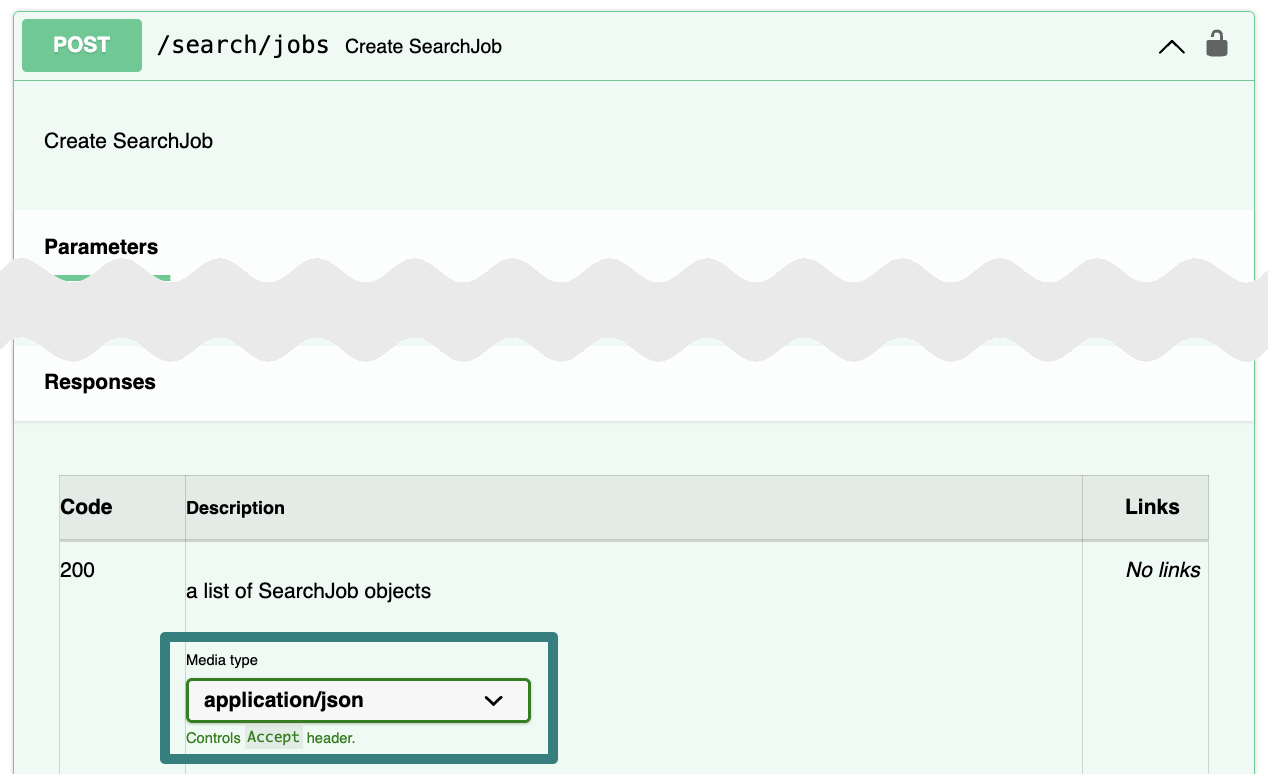
The API Reference also specifies the media type for each endpoint’s responses, which is helpful for ensuring proper data processing.
HTTP Status Codes
The Cribl API can return the following HTTP status codes in response headers:
| HTTP Status Code | Meaning |
|---|---|
| 200 OK | The request was successful. |
| 204 No Content | The request was successful, but there is no content to send in the response. Often used for DELETE requests. |
| 400 Bad Request | The server could not understand the request due to malformed syntax or missing parameters. |
| 401 Unauthorized | Authentication failed because credentials are missing or invalid. |
| 403 Forbidden | The server understood the request but did not authorize it because permissions are insufficient to access the requested resource. |
| 404 Not Found | The requested resource was not found. The endpoint may not exist or the resource may be unavailable. |
| 405 Method Not Allowed | The request method is not supported for the resource (for example, a POST request for a resource that only supports GET). |
| 415 Unsupported Media Type | The server did not accept the request because the payload is in an unsupported data format. Often indicates that the Content-Type header is incorrect. |
| 420 Shutting Down | The server is in the process of shutting down or is in standby. |
| 429 Too Many Requests | The number of requests exceeds a rate limit. |
| 500 Internal Server Error | The server encountered an unexpected condition that prevented it from fulfilling the request. |
| 502 Bad Gateway | While acting as a gateway or proxy, the server received an invalid response from the upstream server. |
| 503 Service Unavailable | The server could not handle the request due to temporary overload or maintenance. |
See the MDN Web Docs for more information about HTTP status codes.