





Basic Concepts
Notable features and concepts to get a fundamental understanding of Cribl Edge.
Cribl Edge as an Agent
Cribl Edge is a vendor-neutral agent for unified telemetry collection.
Edge Nodes are individual agents you deploy to endpoints such as servers, desktops, laptops, containers, applications, and microservices. In a typical deployment, Edge Nodes report to a Leader Node which handles their configuration and updates.
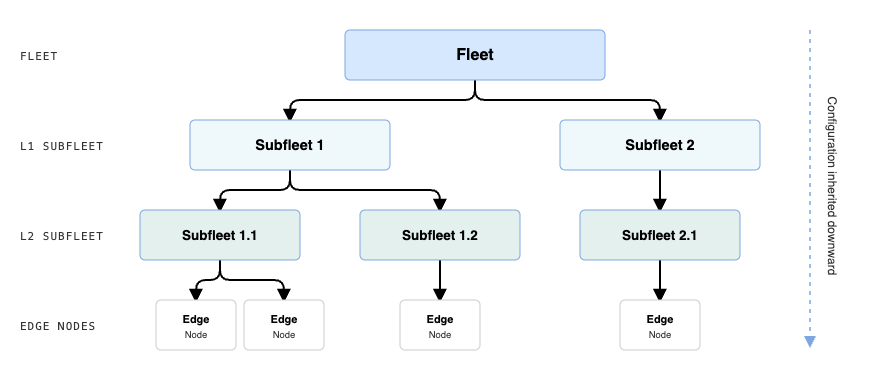
Edge Nodes are organized in Fleets, which are groups of Nodes that share configuration, follow the same update schedule, and participate in the same data flows. Fleets can have multiple Subfleets, which take advantage of configuration inheritance. See Manage Fleets of Edge Nodes for more information.
You can use Outpost Nodes as intermediaries between Edge Nodes and the Leader. Outposts act as a relay for configuration and update communications in case of restrictions such as firewalls. See Outpost for more information.
Cribl Edge and Data Flow
Edge Nodes collect events, logs, and metrics on their endpoints using Sources. Sources are configurations for specific data categories and endpoint types, such as log files or OS-specific metrics. Certain Sources can also receive data from remote senders over protocols such as Syslog or TCP, but Cribl Edge is not designed to ingest large volumes of data from external sources.
Cribl Edge is not intended for collecting data from multiple hosts. If you need to receive and aggregate data from various endpoints, use Cribl Stream instead. Cribl Stream is designed to handle high volume workloads by employing multiple Worker processes.
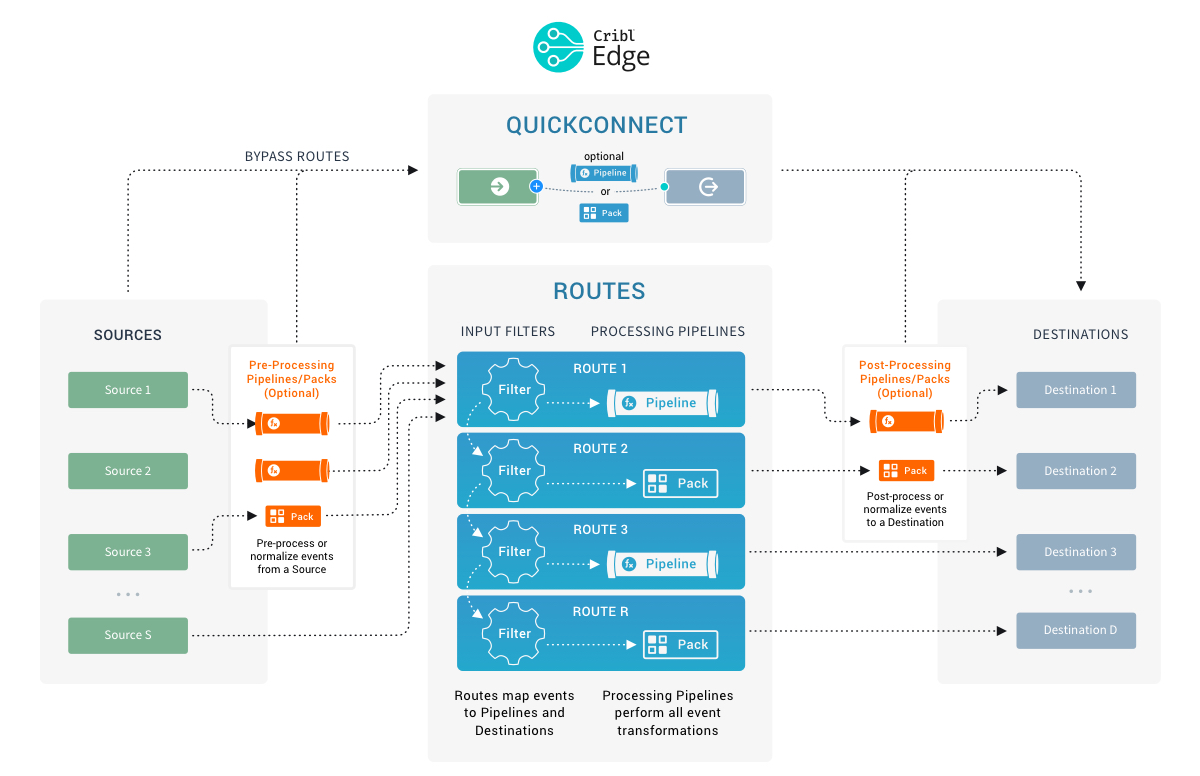
Data collected by Edge Nodes is sent to Destinations using one of two mechanisms:
- QuickConnect - a graphical interface where you can quickly drag and drop connections between Sources and Destinations, optionally including - or excluding - Pipelines or Packs.
- Routes - a complex mechanism for directing events to proper Destinations by filtering them.
See Route Collected Data for more details.
In both mechanisms, you can transform, enrich, drop, and otherwise modify the events by running them through Pipelines containing Functions.
A Pipeline defines what changes you want to apply to events. Each Pipeline contains Functions that handle specific transformations.
Each Route uses one main Pipeline. Additionally, you can attach other Pipelines as pre-processing or post-processing Pipelines to Sources and Destinations, respectively. See Pipelines and Functions for more information.
Cribl Edge Configuration Management
Cribl Edge configuration (Sources, Destinations, Routes, and Pipelines) happens at Fleet level. Organizing Edge Nodes into a hierarchy of Fleets and Subfleets lets you manage configurations at scale and benefit from configuration inheritance. See Fleet inheritance for more information.
You can use Packs to import and reuse complete data flow configurations between Fleets, environments, and deployments. See Packs for more details.