





Leader High Availability/Failover
To handle unexpected outages in on-prem Distributed deployments, Cribl Edge supports configuring standby Leaders for failover. In this High Availability (HA) scenario, if the primary Leader goes down, one of the other Leaders, called standby Leaders, take its place. This ensures continuity of operation, including functions that require the Leader, such as Collectors and Collector-based Sources, which can ingest data without interruption.
For scheduling Collector jobs, High-availability Collectors complements Leader HA. An eligible Fleet can elect a temporary Worker Captain to orchestrate jobs when the Leader is unreachable, without shared Network File System (NFS).
High-availability Collectors does not replace standby Leaders (or a Cribl.Cloud-managed Leader) when you need full control plane resilience. It only covers Collector job orchestration inside the Fleet. While the Leader is down, you still lack an active Leader for anything that requires one, including the Leader UI and API, new commit and deploy changes, ad hoc Collector runs started from the Leader, license updates to restarted nodes, Leader-side metrics aggregation, and notifications generated on the Leader. During a Leader outage, those capabilities still rely on Leader HA (self-hosted) or on Cribl.Cloud operating the Leader for you.
Cribl.Cloud handles High Availability and configuring standby Leaders automatically, requiring no configuration or action on your part.
For license tiers that support configuring standby Leaders, see Cribl Pricing.
Primary and Standby Leaders
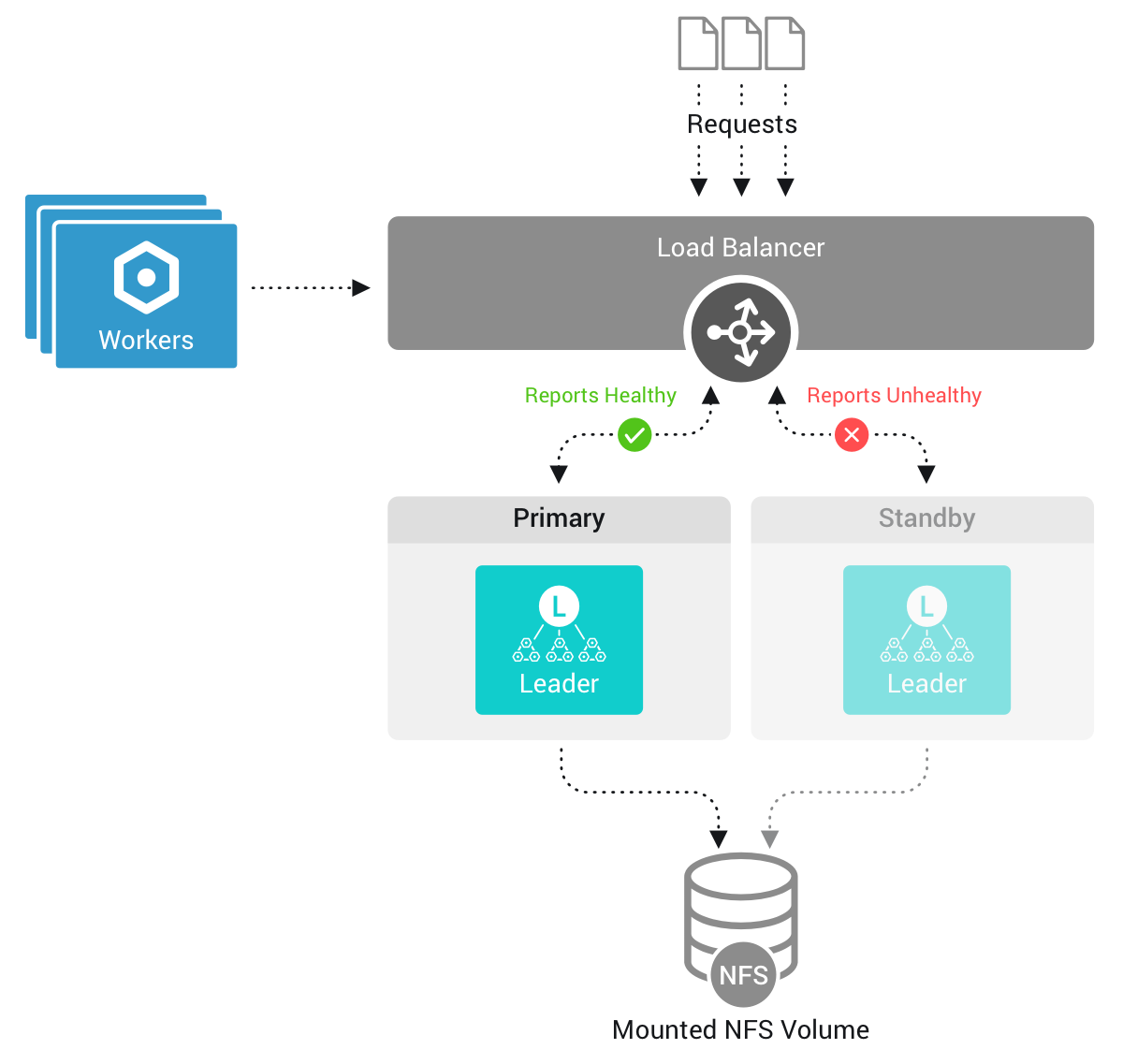
Only one Leader Node is the elected primary at any given time, and only the primary Leader owns Leader state. A standby Leader (or Leaders) takes over as primary in the event of failover, when the primary Leader becomes unavailable.
Leader state backed by SQLite, such as Worker connection data, is always written to local disk, because SQLite file locking is not compatible with NFS. With Leader replication enabled, the active git repository is also on local disk and is replicated to the failover volume rather than being read and written across NFS. All changes to configurations and git commits are replicated to a shared failover NFS volume, and from it to the standby Leaders. The shared volume coordinates the Leaders and holds replicated configuration, git data, and shared Leader state. It is not where you install Cribl Edge. See High Availability Requirements for the distinction between the installation directory and the NFS failover volume.
If the primary Leader becomes unavailable, a standby Leader takes its place. The standby then pulls the required configuration and the latest git commits from the failover volume. All Edge Nodes will connect to the new primary Leader, which retains the state and metrics of the old primary Leader.
By default, a standby Leader reports a standby status from the GET /health endpoint, so the load balancer routes client requests only to the primary Leader.
When you enable Active-Active (Proxy) Mode for HA Leaders, the load balancer can route requests to either Leader, and the standby proxies incoming requests to the primary.
Git-Backed Configuration and Leader Replication
In Leader High Availability (HA) deployments with GitOps enabled, Leader replication aligns branches. The local Git branch for the active Leader Node matches the branch on the failover (HA) volume repository.
For more information about CRIBL_GIT_REMOTE, CRIBL_GIT_BRANCH, and related bootstrap behavior, see usage notes for CRIBL_GIT_REMOTE.
Leader Settings in High Availability Setups
When you first configure Leader High Availability, Cribl Edge will create a new leader.yml file in the local $CRIBL_HOME/local/cribl directory and will upload it to the failover volume. Configuration stored in the leader.yml file on the failover volume will take precedence over what is stored in the local instance.yml file.
The leader.yml file replicates most of the content of the local instance.yml, but leaves out the failover configuration.
While running in failover mode, when you change Settings > Distributed Settings via the UI, Cribl Edge applies those changes to leader.yml in the failover directory.
See Configure Standby Leader Nodes for information on how to prepare standby Leaders for a failover scenario.