





Plan a Pack-Based Strategy
To get started with Pack-based configuration management for Cribl Edge, your first objective is to create a Pack-based configuration management strategy that fits your team’s workflows and operational needs. A thoughtful plan helps reduce duplication, simplify maintenance, and make your deployments more predictable and secure.
Your configuration plan should define:
- The Purpose and Scope of the Pack: The scope of the configurations in your Pack, which involves deciding whether to include Sources and Destinations. It also includes determining how data will flow in and out of Packs to other resources in Cribl Edge.
- Pack Variables: The variables you want to templatize in your Pack for easy transfer and adaptation across environments.
- Sensitive Data and Secrets: The sensitive data you need to store in Packs, including passwords, API keys, or security certificates, and authentication credentials.
- Pack Versioning System: Your Pack versioning and branch promotion strategies, which ensures your Packs remain consistent and synchronized across your Fleets.
The Purpose and Scope of the Pack
The core building block of every configuration management system is the Pack. A Pack contains a bundle of configurations that you want to develop, test, version control, and distribute to multiple Organizations or Fleets.
If you’re familiar with Packs from prior versions of Cribl Edge before 4.12, it’s important to know that Packs have evolved. In previous versions, Packs were mainly used to package processing logic and included Pipelines, Routes, Functions, Knowledge objects, and sample data files. Packs can now contain complete, end-to-end data flow configurations for a single data stream.
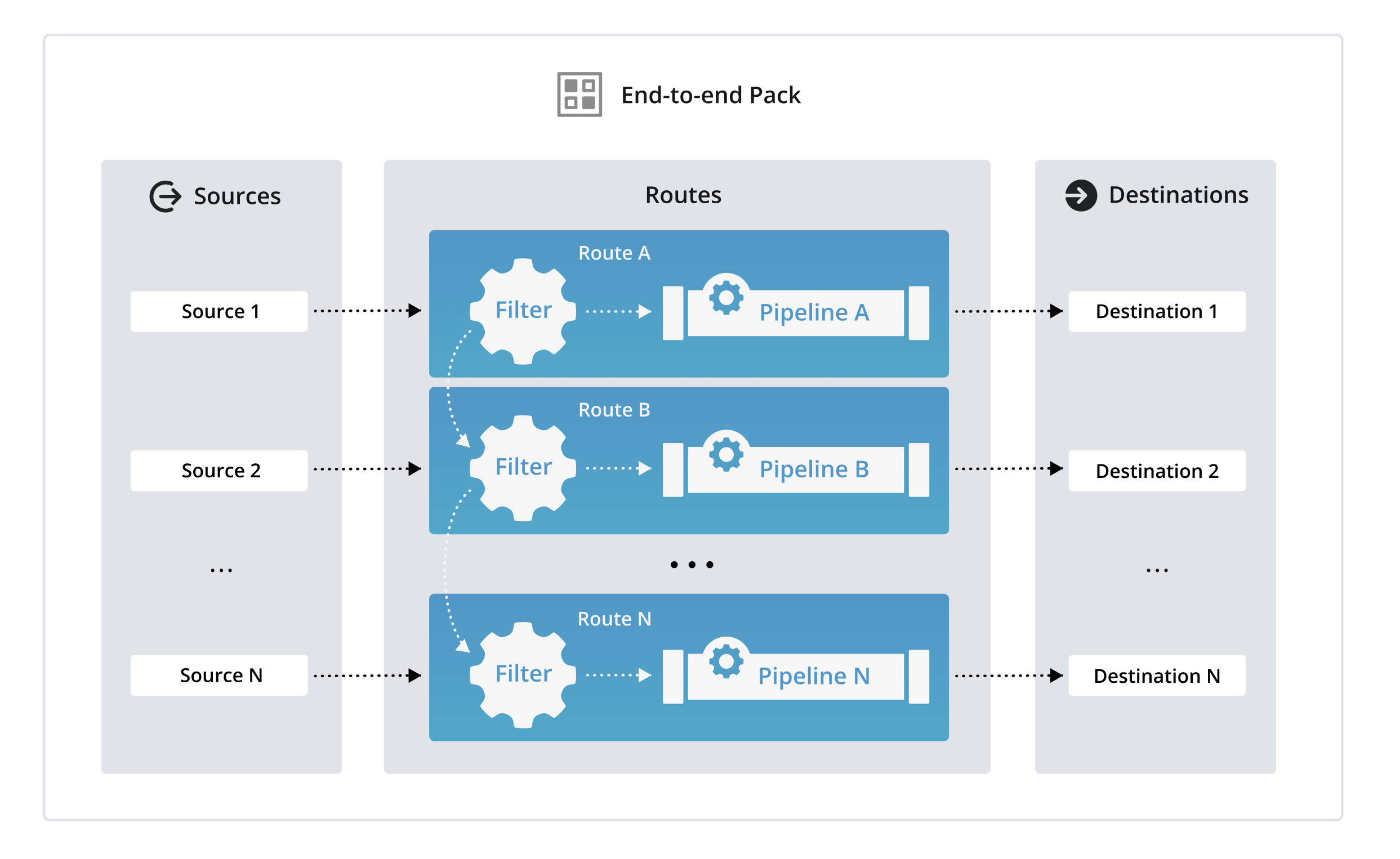
For that reason, carefully plan the scope of the Pack you want to track with version control, which primarily means deciding whether to include Sources and Destinations in your Pack:
| Scope | Contains | When to Use |
|---|---|---|
| Limited scope | Only include Routes and Pipelines that process data. Do not include Sources and Destinations in these Packs. | When you only want the Pack to process data, meaning it will just contain a Route and Pipeline and related Knowledge objects. |
| End-to-end scope |
| When you want to configure your full end-to-end Cribl Edge deployment inside a Pack. |
| Source-side scope |
| When you want to use a Pack similar to a pre-processing Pipeline. |
| Destination-side scope |
| When you want to use a Pack similar to a post-processing Pipeline. |
Keep each Pack scoped to a single purpose or use case where possible. Avoid mixing too many unrelated Sources or Destinations in one Pack. It increases complexity and makes version control more difficult. Consider these possible approaches for designing your Pack scope:
- One Pack per vendor or technology: Create a Pack for a specific technology (such as AWS CloudWatch or Syslog messages).
- One Pack per data lifecycle stage: Divide Packs by their function: one for normalization, one for enrichment, and one for redaction.
- Packs for shared services: Create a Pack that performs a universal task (such as redaction) that multiple other data streams can be routed through before reaching their next Pipeline or Destination.
Packs are fully self-contained, meaning that the objects inside the Pack are not aware of anything outside of the Pack context unless you use Routes to send data outside the Pack context. So, if you include a Source or Destination inside a Pack, it won’t be aware of data from an external Source or Destination unless you integrate it into your data processing system by connecting it to a Source or Destination.
The rest of this guide assumes you plan to build Packs that include Sources and Destinations. However, you can adapt this guide to Packs with more limited scopes.
Design the Pack Data Flow
Packs allow you to break down repetitive configurations into modular, reusable components that can be chained together into a single data stream flow. Rather than a single, complex Pipeline at the Fleet level, you can chain specialized Packs together by routing data through Routes at the Fleet level.
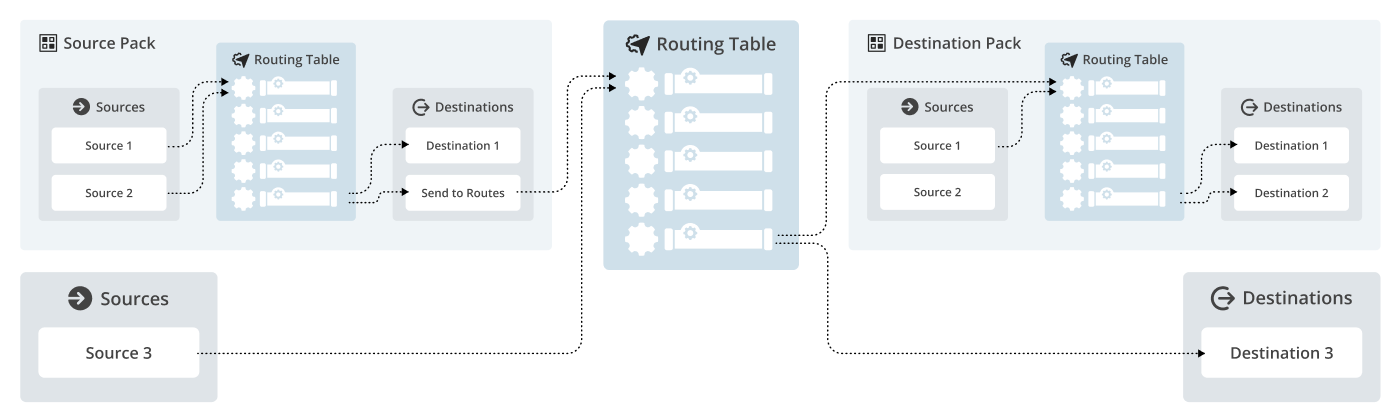
You can design the scope of Packs using a few patterns that consider the overall flow of data:
Source-side Packs: These Packs can contain one or more Sources and any specific Pipelines needed to normalize raw data into a standard internal schema. You could also use this Pack to drop or aggregate any unnecessary fields and events to optimize incoming data. From there, the data can flow out of the Pack to Routes at the Fleet level for further processing.
Destination-side Packs: These Packs can contain one or more Destinations and any specific Pipelines that prepare or optimize the incoming data for the requirements of the downstream receiver. The Pipelines in these Packs can refine, format, and batch data so that the Destination can ingest it as efficiently and cheaply as possible. Routes are the mechanism that sends data from the Fleet level to these Packs.
Pass-through processing Packs: Data originates from a Source that exists at the Fleet level, then passes through Routes, which sends the data to a Pack for specific enrichment step before returning to Routes for further routing.
These workflows are ideal for organizations that require functional decoupling of their configuration logic. By segregating Source and Destination logic into independent Packs, individual contributors can iterate on specific data streams in isolation, eliminating the risk of cross-contamination or breaking global configurations.
Avoid processing data twice. When planning your flow, decide exactly where heavy data processing (like masking or Regex operations) should occur. Performing the same transformation in both a Source-side Pack and a Destination-side Pack wastes CPU cycles and increases latency.
See Connect Packs to Global Sources and Destinations for more specific information about how to route data in and out of Packs.
Pack Variables
If you plan to use the same Pack across multiple environments, take some time to identify which configuration values are environment-specific. These may include:
- Endpoint URLs or hostnames.
- Port numbers.
- Region-specific settings.
- Authentication details.
To reduce duplication and make your Packs reusable across environments, use Pack variables to templatize these values. In Cribl Edge, Pack variables let you define values that can be adapted to the local environment. This allows you to:
- Set environment-relative defaults (such as
api_base_urlordestination_bucket). - Avoid hardcoding environment-specific information directly in your configuration.
Keep the following guidelines in mind about variables:
- Field binding behavior: Pack variables are bound to specific fields. If you update the variable’s value, the corresponding field will reflect the change. However, if you delete the variable, the field retains its last set value rather than reverting or clearing it. See How Field Binding Works for more detailed information.
- Field compatibility: Variables are only supported in certain fields, which means you can’t use variables universally in every field. Fields that can accept variables have a Variable icon
 next to them.
 - Exporting secrets: Sensitive values, such as passwords or API keys, are bundled up with a Pack and exported along with the Pack.
- Use variables and naming conventions consistently: When Packs include Sources and Destinations, use clear, environment-aware naming (such as
src_aws_logs_dev,dst_s3_prod). Consider using Pack-level variables to template environment-specific values.
See Configure Variables and Secrets for more specific information about how to use variables.
How Field Binding Works
When you bind a Pack variable to a configuration field, you create a dynamic link. Updating the variable’s value automatically pushes that change to all bound fields. However, if you delete the variable, the binding is removed and the field retains its last resolved value as a static, hard-coded setting.
To see how Cribl Edge manages this binding, select Manage as JSON on a Source or Destination that uses a variable. Notice that any field bound to a variable generates two distinct entries that share related names:
| Field type | Description | Examples |
|---|---|---|
| Static field | A hard-coded value that uses the last known value. This serves as the fallback value in case of deletion. | "host": "localhost""udpPort": 3000 |
| Variable template field | Prefixed by __template_, this lists the field name and the stored variable reference. | "__template_host": "my-host-variable""__template_udpPort": "my-port-variable" |
The __template_ entry takes precedence over the static field. If you delete the variable, Cribl Edge removes the __template_ entry from the JSON. Because the static field still exists, the configuration reverts to the last set value, ensuring the data stream remains functional even though it is no longer dynamic.
Never delete the static version of a configuration field from the JSON, even if a
__template_field is present. The static field is a required component of the configuration file stored on the disk.
Sensitive Data and Secrets
Cribl Edge allows you to optionally authenticate to Sources or Destinations using TLS (Transport Layer Security), which encrypts traffic and helps ensure secure communication with upstream or downstream services. TLS certificates help verify the identity of the remote service and can also support mutual authentication when required.
When working with Packs, use the built-in secret store and named TLS certificates to manage all sensitive data. These methods are crucial for making your Packs portable and secure across different environments. You should plan to use the same process for all secrets, whether they are passwords, API keys, or security certificates.
Key considerations for your plan:
- Secret isolation and referencing: Unlike other configurations, sensitive values and secrets (such as TLS certificates and authentication credentials) are not bundled within Packs when you export them. Instead, a Pack only stores a reference to a secret by its name. This means:
- You can build TLS-secured Sources and Destinations directly into your Packs.
- The sensitive data (such as certificates) remains isolated in each Fleet’s local secret store.
- Environment-specific secret management: Plan to manage unique secrets for each environment (such as
devorprod) while using the same underlying Pack configuration across all environments. - Deployment prerequisites: Cribl Edge stores secrets and certificates at the Fleet level, so ensure that the secrets and certificates are properly deployed to the correct Fleets. For a Pack to deploy successfully with TLS-secured components, a certificate with the matching name must already exist in the target Fleet’s secret store.
Use the Cribl secret store whenever possible. This ensures different Cribl environments can hold their own distinct secret values, without needing you to redefine the setting multiple times within the Pack.
For Sources or Destinations defined at the global level (outside of a Pack), Cribl Edge stores TLS certificates at the Fleet level. Any Edge Nodes in the Fleet can access those certificates when processing data.
For Sources or Destinations defined at the Pack level (inside a Pack), you can reference a TLS certificate by its name. This approach enables portable and secure configurations across environments:
- When you export that Pack, you can choose whether to bundle sensitive resources along with the Pack. If you choose not to bundle the resources, it does not include the TLS certificate itself, only the reference to the certificate name.
- When you import that Pack to a Fleet, you can choose whether to overwrite the local certificate store or not. If you choose not to overwrite it, Cribl Edge checks the local certificate store for that Fleet. If a certificate with the same name exists, Cribl Edge automatically binds it to the Fleet.
This approach allows you to:
- Build TLS-secured Sources and Destinations directly within Packs.
- Reuse Pack configurations across environments without exporting certificate data.
- Maintain secure, environment-specific certificate management practices.
Pack Versioning System
The last thing to consider as part of your configuration management plan is what your strategy for updating Packs will be.
Key considerations:
- Packs support semantic versioning structures (
0.0.0), which correlates toMajor.Minor.Patch. - The core principle is that each increment of the Pack’s semantic version number signifies a stable, tested state of the configuration suitable for promotion to the next environment.
- You can update Packs to new versions using the Upgrade option.
- When you upgrade a Pack, Cribl Edge compares the current Pack version against the Pack version in the external Git repository. If the version number has increased, Cribl Edge imports the latest changes from the Git repository to the Pack in the local environment.
IMPORTANT: Commit and Push Changes to Avoid Data Loss
When you upgrade a Pack with a higher version number, it overwrites any local changes to the Pack. To prevent loss, individual Pack developers should always ensure that they have saved, committed, and pushed changes from their local sandbox environment to their feature branch on the external Git repository before upgrading.
With these considerations in mind, the next section describes a recommended version increment strategy across environments.
Versioning Best Practices
Consider implementing these policies and strategies as part of your plan:
- Define which Git events or processes trigger branch promotion: As part of your workflow, determine which events in Git events initiate pushing changes to environments. Options could include merging a pull request, committing to a specific branch, an automated schedule, and more.
- Define what counts as a breaking changes in Packs: This needs careful thought from your team. Examples could include removing or renaming a required field in a Function or Pipeline, changing the data schema of a Pipeline in a way that breaks downstream receivers, changes that cause significant backpressure in downstream receivers, significantly altering routing logic that impacts data flow assumptions, and more.
- Rollback strategy: If a production deployment causes issues, your rollback mechanism should involve reverting the
prodbranch to the tag or a previous known-good version and re-deploying that specific version. - Documentation alignment: Ensure that internal documentation explicitly states the semantic version of the deployed Pack and explain the changes included in each version.