





About Persistent Queues
Cribl Edge’s persistent queues (PQ) supplement in-memory queues to minimize data loss during a backpressure event. When a backpressure event occurs, Cribl Edge can engage a backpressure queue to temporarily store data by writing it to persistent queue storage during the outage. When the outage resolves, Cribl Edge then forwards data from the queue.
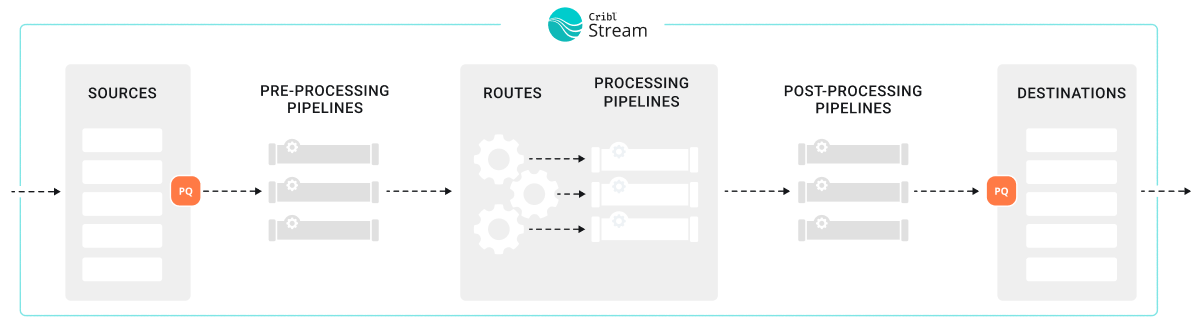
Cribl Edge’s persistent queue (PQ) feature helps minimize data loss in these situations:
- A downstream Destination receiver is unreachable.
- A downstream Destination receiver is slow to respond. (This feature is only available in Cribl Edge 4.9.0 and newer.)
- When a configured Source sends a higher volume of data than Cribl Edge can process.
Persistent queues are best in environments that need more durability and reliability. Persistent queues might be a good fit if:
- Your environment regularly experiences outages or backpressure events that last longer than short-term memory queues can sustain, which is typically only a few seconds.
- Your business or organization has a low level of tolerance for data loss.
- You need data from upstream senders that do not provide their own buffering for backpressure queues, such as UDP senders.
You can use persistent queues on:
See Supported Destinations and Supported Sources for more information.
The effectiveness of persistent queues to minimize data loss depends on your deployment type, configuration settings, and how much disk space you have allocated for persistent queues. For more information about how to optimize and tune your persistent queue settings, see:
The persistent queue feature is only available for certain Cribl plans or license types. See the Pricing page for details.
How Persistent Queues Work
The persistent queue feature works differently on Sources than it does on Destinations. For information about how it works, see:
When to Use Persistent Queues
When deciding whether to use persistent queueing or not, these factors should guide your decisions:
| Factor | Is PQ Recommended? |
|---|---|
| Cribl.Cloud Deployments | Yes, but ensure you understand how persistent queues work before enabling. |
| Support for Backpressure Queues on Data Senders and Receivers | Only use backpressure queues on either Cribl Edge or the sender/receiver. Not both. |
| Integration and Protocol Support | Ensure the Source or Destination supports persistent queue. Persistent queue is strongly recommended for UDP Sources. |
| Likelihood of Outages and Backpressure | If your system regularly experiences outages and the duration of these outages is longer than short-term memory can sustain, use persistent queues. |
| Risk Tolerance for Data Loss | If you have a high need for data integrity, use persistent queues. |
| Infrastructure Costs Needed for Persistent Queue | Balance business requirements against the cost of maintaining persistent queues to prevent data loss. |
Cribl.Cloud Deployments
If your environment is a Cribl-managed Cribl.Cloud deployment, Cribl manages the performance and tuning of your cloud deployment. For that reason, there is not a clear downside or tradeoff for enabling persistent queue. Instead, ensure you understand how persistent queues work for both Sources and Destinations and then make a decision about whether to enable it or not.
On Cribl-managed Cribl.Cloud Stream Worker Groups (Enterprise plan), most configuration options are managed automatically by Cribl to optimize performance. In the UI for Cribl.Cloud, enabling persistent queue only exposes the destructive Clear Persistent Queue button. This action is destructive and should only be used as a last resort. See How to Safely Disable and Clear Persistent Queues for more information.
When you enable persistent queues in Cribl.Cloud, Cribl automatically allocates up to 1 GB of disk space per Destination, per Worker Process. This 1 GB limit applies to outbound uncompressed data, and the queue does not perform any compression. If the queue fills up, Cribl Edge blocks data flow.
You cannot change this limit. If the queue fills up, Cribl Edge will block outbound data. Use a hybrid Stream Worker Group if you need to configure:
- Queue size
- Compression
- Backpressure modes
- Other persistent queue settings
For hybrid and on-prem deployments, evaluate the additional factors described on this page when making a decision about implementing persistent queues.
Support for Backpressure Queues on Data Senders and Receivers
For both cloud and on-prem deployments, take some time to learn about the upstream and downstream senders and receivers for your data. Do these senders and receivers support backpressure queues? For example, upstream senders that are UDP-based do not support backpressure queues, but TCP-based Destinations tend to have backpressure queue support.
If the upstream sender or downstream receiver supports backpressure queueing, determine whether to use the native backpressure queue features in those senders and receivers instead of the Cribl Edge persistent queues. In general, you should only use backpressure queues on either Cribl Edge or the sender/receiver. Using them both together on both ends of transmission is redundant and can result in data latency issues. However, latency is a natural consequence of queueing, so you need to balance your needs for data resiliency against your needs for timeliness.
The alternatives to using persistent queue are to block data or to drop events when a backpressure event occurs. Consider blocking events if you need Cribl Edge to return block signals back to an upstream sender. If the sender also supports backpressure backpressure response mechanisms, the sender may stop sending data.
Consult the documentation for the sender to ensure you know how that specific sender handles a backpressure signal. In general, TCP-based senders support backpressure and stop sending data once Cribl Edge stops sending TCP acknowledgments back to it.
What is the difference between a persistent queue and a backpressure queue?
Persistent queues are specifically on-disk storage. Backpressure queues can be either in-memory or on-disk buffers. Most systems have some type of backpressure queueing, which is not quite the same as the persistent queue feature provided by Cribl. When you integrate a sender or receiver to Cribl Edge, ensure you research and understand the options provided by those senders and receivers. Carefully consider how these two systems might interact together.
Integration and Protocol Support
Check the Supported Destinations and Supported Sources to ensure persistent queue is available for that integration.
For UDP Sources, persistent queue is strongly recommended. Downstream blocking is especially risky because UDP senders do not support backpressure signaling. When Cribl Edge cannot process incoming UDP data fast enough due to downstream backpressure or processing bottlenecks, it will drop new events rather than signal the sender to slow down.
To reduce data loss during short-term downstream issues:
Enable Source persistent queue on UDP-based Sources where supported. This allows Cribl Edge to buffer incoming events to persistent storage when downstream components are slow or blocked. When persistent queue is enabled, Cribl Edge bypasses the Advanced Settings > Max buffer size (events) and uses only the persistent queue’s own buffering controls. In Cribl Edge 4.10 and newer, this field is hidden and ignored whenever Source sPQ is enabled for UDP-based Sources.
Increase UDP socket buffer size (bytes) in Advanced Settings to handle brief traffic spikes. Increase this kernel-level buffer to prevent the OS from dropping events before Cribl Edge can process them.
Monitor for dropped messages on the Source’s Status tab. Dropped messages may indicate the need for larger buffers or that downstream pressure is exceeding what buffering can absorb.
For more information, see UDP Tuning.
Likelihood of Outages and Backpressure
For self-managed (on-prem) deployments, consider the overall likelihood of outages or other backpressure events that could result in data loss:
- Does your system regularly experience outages or backpressure?
- What is the duration of these outages or events?
- Do the outages or events often last longer than short-term memory queues can sustain?
If so, then persistent queueing might be the right choice for your system.
Risk Tolerance for Data Loss
For on-prem deployments, determine whether your organization has a high or low risk tolerance for data loss. If they have a high need for data integrity, persistent queueing might be appropriate.
Infrastructure Costs Needed for Persistent Queue
For on-prem deployments, you may need to balance your business requirements against the cost of maintaining the resources and infrastructure necessary to engage persistent queues to prevent data loss. Persistent queues incur costs related to processing, computing, and storage because you have to write the data to disk.
Persistent queues can be resource-intensive for Worker Processes. When enabled, each Worker Process maintains a queue for both Source and Destination persistent queues. Depending on your configuration and the frequency of outages, Worker Processes may allocate significant processing power and compute resources to managing these queues.
Persistent queues also introduce overhead when they engage. Writing to or reading from the disk is slower and demands CPU resources. For instance, using Source persistent queues in Smart Mode can increase CPU overhead if the queue frequently engages and disengages during operation.
Fortunately, performance tuning your persistent queue system could help reduce costs.
How to Optimize Persistent Queues
A well-optimized data throughput system can efficiently and reliably processes and transfer data from Sources to Destinations. Optimized systems maximize performance while minimizing latency, errors, and resource consumption. An optimized system has these characteristics:
- High efficiency: Data flows seamlessly at the maximum achievable rate without bottlenecks or excessive resource usage. The system gracefully handles backpressure events, ensuring that data intelligently throttles or queues without overwhelming downstream components.
- Reliability: The system consistently handles variations in data volume or speed without losing or corrupting data, even during spikes or failures.
- Scalability: The system adapts smoothly to increasing data loads or additional data senders or receivers without degradation in performance.
- Low latency: The system processes and delivers data in near real-time, meeting the required time constraints for your business use cases.
- Cost-efficient resource allocation: The system uses CPU, memory, disk, and network resources effectively, avoiding over-provisioning or waste.
- Security and compliance: The system transmits data securely, meeting all relevant privacy, encryption, and regulatory requirements.
Ultimately, you and your business stakeholders should have confidence in the system’s performance, reliability, and ability to adapt to future needs. Persistent queue is an important tool to achieve this confidence.
For additional information about performance and tuning when configuring persistent queues, see:
Persistent Queue Optimization Metrics
The most effective way to performance tune is to understand which key metrics give insights into your persistent queues system’s overall health. Effective system administrators study their deployments to establish a performance baseline that they can use for comparison if a performance issue arises. Most system administrators understand their system well and can easily identify peak data periods.
Pay attention to these metrics:
- CPU utilization: When your system gets sudden increases in data loads, you might notice that your Worker Processes operate at full capacity and use all their CPU. Generally, that’s a sign of inefficiency or the need for more resources. If needed, you can teleport into a single Edge Node and view all the processes and their individual CPU utilization. To see your CPU utilization, you can use the system monitoring tools to analyze CPU utilization.
- Data storage and API costs: When you back up data to a disk, that requires available disk space to use. Allocating memory and disk space can potentially be expensive. Be aware of the rate at which you consume disk memory and the general costs you estimate you will incur to write data to disk. Have systems in place for knowing when disk space is running out and adding more memory as needed, such as Notifications.
- Local and NFS: Monitor the available disk space on the volume. If space falls below your minimum free disk space threshold (default 5 GB), queuing stops.
- S3-Backed: Storage is virtually unlimited in the bucket, but you must monitor Local Cache Headroom. You must have enough local disk space to hold the full
maxSizeof all active queues in case S3 becomes unreachable. Additionally, monitor your S3PUTrequest volume. If costs are too high, ensure Optimize S3 cost is toggled on to batch smaller slices into fewer uploads.
- Data latency: Some persistent queues can add latency because of the amount of overhead time it takes to write data to disk. As a starting point, assume that each event incurs a few milliseconds of added latency. Be aware that data latency can vary by file system, such as whether you are using a local file system or shared storage (NFS or AWS S3):
- NFS: Introduces the highest and most variable latency because every write is a synchronous operation over the network.
- S3-Backed: Minimizes latency by writing to a local write-through cache first, then asynchronously uploading data slices to S3. This provides near-local performance with shared storage durability.
- Local: Offers the lowest latency. Compare your throughput times with and without persistent queue to establish your baseline.
- Memory: Monitor the persistent queue Buffer size limit (specifically for NFS). When memory is fully utilized, the Edge Node must flush data to the persistent store. High memory pressure during a backpressure event can indicate that your drain rate is too slow or your incoming data volume is exceeding your hardware’s I/O capabilities.
- Data throughput: You need to understand your system’s throughput under normal conditions so that you can identify potential bottlenecks in the system. Use the system monitoring tools to develop this baseline.
Persistent Queue Limitations and Constraints
Persistent queues:
- Operate at the Worker Process level, with each Worker Process sharing the same configuration settings for a given Source or Destination. These settings are inherited from the respective Source or Destination. The size and engagement model of the queue may vary depending on the specific Source or Destination. When using shared storage (Cribl Stream only), all Worker Processes in the Worker Group share the same storage location (such as S3 or NFS), but each process maintains its own distinct directory and local write-through cache to avoid I/O contention.
- Have a finite size. If the system cannot deliver data, it might eventually exhaust available disk space.
- Provide limited data protection in cases of application failure. For example, a crash may cause the loss of in-memory data.
- Offer limited protection in cases of disk failure or data corruption. However, for host or machine loss on Cribl Stream only, shared storage solutions such as S3 or NFS allows surviving Nodes to recover and drain data that would otherwise be lost on the decommissioned host.
If you turn off persistent queue for a Source or Destination (or shut down the whole Source or Destination) before the queues drain, you will orphan any events still in the persistent queue store.
- If data storage is local: This data is inaccessible unless you re-enable the queue on the same Edge Node.
- If data storage is shared (NFS or S3, Cribl Stream only): This data remains in the S3 bucket or NFS mount. While other Nodes can potentially recover this data, you should always wait for queues to drain before disabling the feature to ensure a clean transition.
See How to Safely Disable and Clear Persistent Queues for more information.
The following constraints apply to certain Destinations:
- With load-balanced Destinations, persistent queue engages only when all of the Destination’s receivers are slow or blocking data flow. A single live receiver will prevent persistent queue from engaging on the corresponding Destination. Persistent queue will not engage if at least one outbound TCP socket connection is active, even if the receiver is sending a backpressure signal.
- For Kafka-based Destinations (such as Kafka, Confluent Cloud, Amazon MSK, and Azure Event Hubs), persistent queues engage when Cribl Edge can’t reach the brokers.
- The system controls HTTP/S-based Destinations to prevent retries of failed events. However, some events in transit to the Destination may still emerge as duplicates.
Backpressure Behavior with Multiple Destinations
When Cribl Edge sends the same event to multiple Destinations, the resulting behavior depends on the backpressure setting for each Destination:
- Block: If any Destination is configured to Block and enters backpressure, Cribl Edge blocks delivery for that event across all Destinations that receive the same input data. As a result, if one Source delivers the same events to multiple Destinations, one of which is set to Block, the Source will stop sending to all connected Destinations.
- Persistent Queue: If a Destination is configured to use Persistent Queue, Cribl Edge can queue that copy of the event locally while healthy Destinations continue to receive data, as long as the queue has available capacity.
- Queue-full: If a queue becomes full, Cribl Edge blocks or drops new data according to the configured Queue-full behavior for that specific Source or Destination.
This behavior applies whenever the same event is sent to multiple Destinations, including:
- Fan-out patterns using QuickConnect to multiple Destinations.
- Multiple Routes with Final toggled off.
- Output Router rules with Final toggled off.
For load-balanced Destinations, persistent queue engages only when all receivers are slow or blocking. A single healthy receiver prevents persistent queue from engaging on that Destination.
How to Safely Disable and Clear Persistent Queues
If you want to disable persistent queuing, always wait for the queue to fully drain. The Clear Persistent Queue button is available as a destructive fallback. This action frees up disk space, but it also deletes the queued data without sending it on to receivers.
After the queue has drained, then you can select a different backpressure behavior. Save the configuration after changing it.
Supported Destinations
Cribl Edge supports persistent queue for:
- HTTP-based Destinations
- TCP Load-Balanced Destinations
- Destinations that write to a single receiver (without load balancing enabled)
To determine whether Cribl Edge supports persistent queue for a specific Destination, consult the documentation for that Destination.
Supported Sources
Cribl Edge supports persistent queueing for Push Sources. These sources ingest streaming data, which makes it possible to enable persistent queue.
Persistent queueing is not available for Pull and Collector Sources, which ingest data intermittently and/or from static files.
To determine whether Cribl Edge supports persistent queue for a specific Source, consult the documentation for that Source.