JSON Schemas
Cribl Edge uses JSON schemas for validating JSON events.
You can use the built-in Cribl Schema or create custom ones
and use them to validate any fields by using the C.Schema expression.
JSON schemas are based on the popular JSON Schema standard, and Cribl Edge supports schemas matching that standard’s Drafts 0 through 7.
You can refer to a single JSON schema in multiple expressions. When editing them, be aware that any change will affect all places it is used in.
Cribl Edge supports two kinds of schemas:
- JSON schemas for validating JSON events, described on this page.
- Parquet schemas for writing data from a Cribl Edge Destination to Parquet files.
These schemas serve different purposes. Operations that work for one kind of schema can’t be used with the other. For example, the validation method for JSON schemas can’t be used to validate Parquet schemas.
Validate an Object Against the Schema
To validate an object against a schema, use the C.Schema expression:
C.Schema('<schema_name>').validate(<object_field>).
You can call this method anywhere in Cribl Edge that supports JavaScript expressions. Typical use cases for schema validation include:
- Making a decision before sending an event down to a Destination.
- Making a decision before accepting an event (for example, dropping an event if invalid).
- Making a decision to route an event based on the result of validation.
Add New Schema
To add a new JSON schema:
- In the sidebar, select Fleets and choose a Fleet.
- In the Fleets submenu, select More.
- If you are adding the schema to a Pack, select Packs and choose your Pack.
- Select Knowledge, then Schemas.
- Select Add Schema.
- Enter an ID for the regex and an optional Description.
- In Schema, paste the JSON schema content.
- Select Save.
JSON Schema Example
To add this example JSON Schema, enter the following into New Schema fields:
- ID:
schema1. - Description: (Enter your own description here.)
- Schema: Paste the following schema.
{
  "$id": "https://example.com/person.schema.json",
  "$schema": "http://json-schema.org/draft-07/schema#",
  "title": "Person",
  "type": "object",
  "required": ["firstName", "lastName", "age"],
  "properties": {
    "firstName": {
      "type": "string",
      "description": "The person's first name."
    },
    "lastName": {
      "type": "string",
      "description": "The person's last name."
    },
    "age": {
      "description": "Age in years which must be equal to or greater than zero.",
      "type": "integer",
      "minimum": 0,
      "maximum": 42
    }
  }
}Assume that events look like this:
{"employee":{"firstName": "John", "lastName": "Doe", "age": 21}}
{"employee":{"firstName": "John", "lastName": "Doe", "age": 43}}
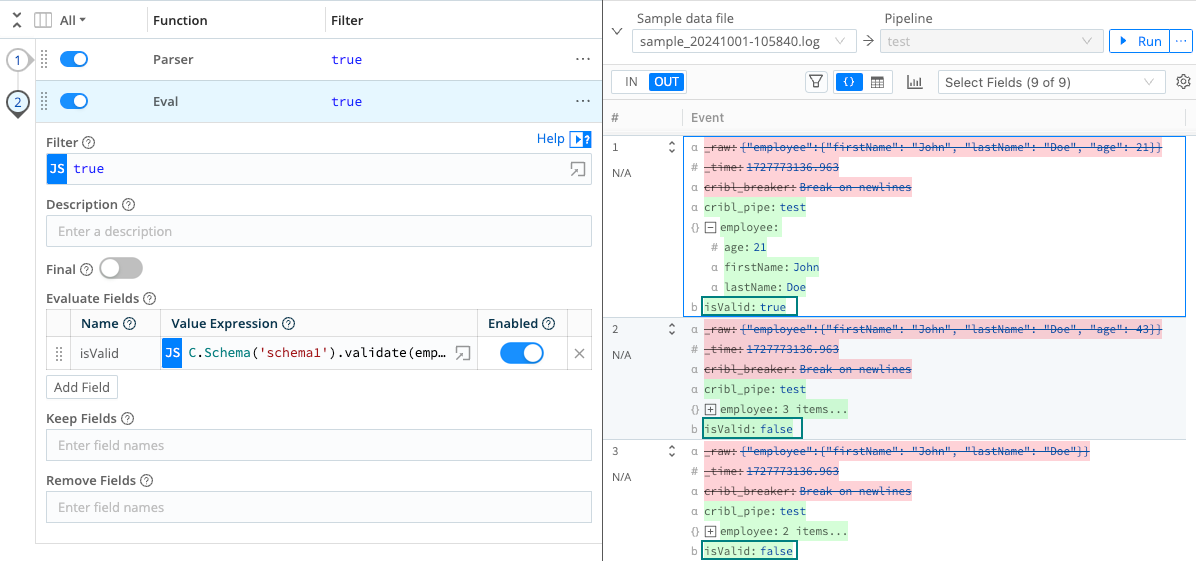
{"employee":{"firstName": "John", "lastName": "Doe"}}To validate whether the employee field is valid per schema1, we can use the following:
C.Schema('schema1').validate(employee)
Results:
- First event is valid.
- Second event is not valid because
ageis greater than the maximum of42. - Third event is not valid because
ageis missing.