





Required Ports in Cribl.Cloud
Understanding the ports used across Cribl.Cloud is the key to clarifying your firewall rules. This functional view illustrates the connections for data flow, management traffic, and communication channels between the Cribl.Cloud Leader, Cribl Stream, and Cribl Edge components.
Before deploying any Hybrid Worker Groups or Edge Fleets, coordinate with your network team to ensure the necessary firewall rules and Network Security Groups (NSGs) are configured.
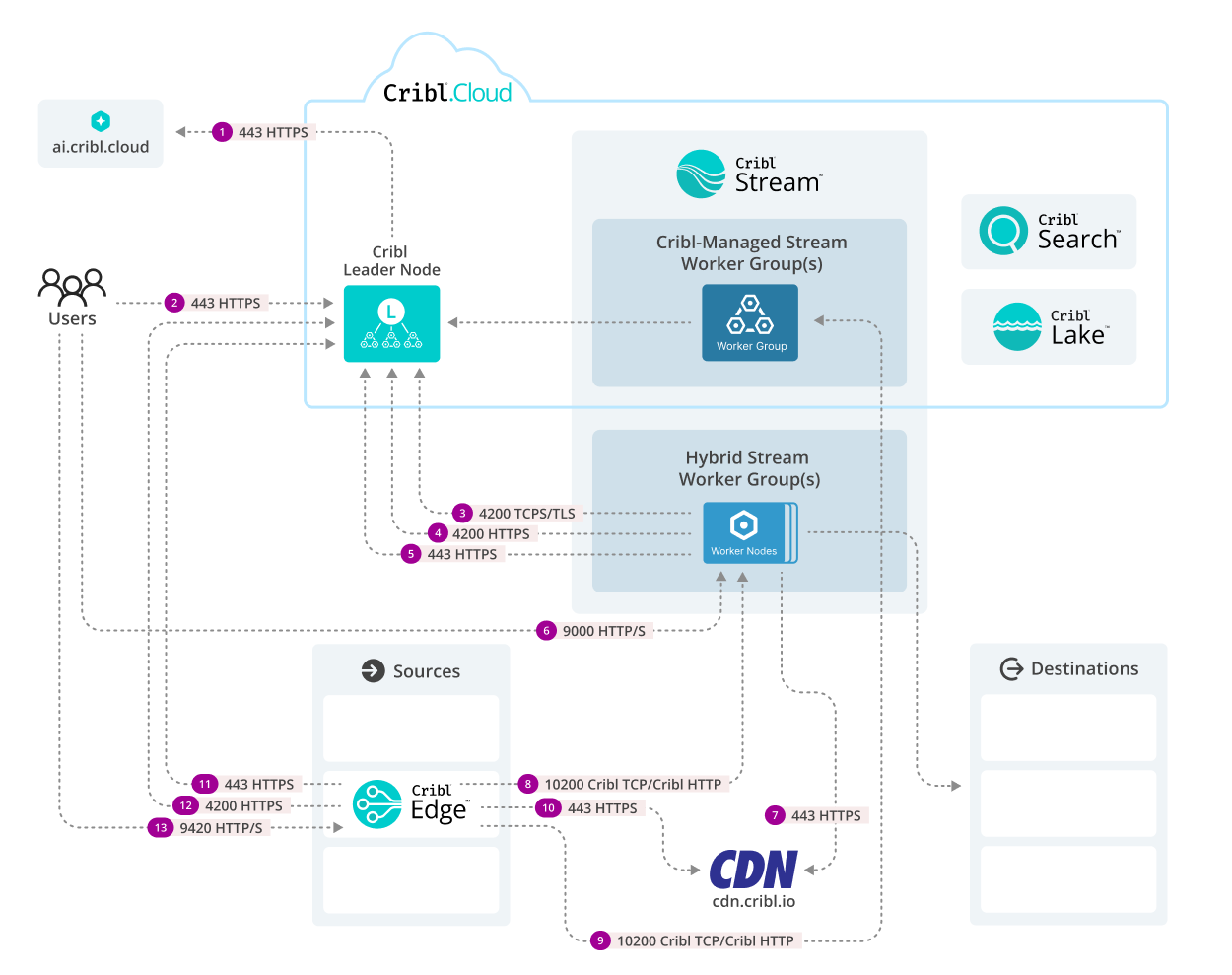
This Ports in Cribl.Cloud diagram illustrates the port-level connectivity across Cribl’s architecture for Cribl.Cloud and hybrid deployments. The Cribl.Cloud Leader Node acts as the central control plane, directing traffic to the managed Worker Groups, while Cribl Edge facilitates data collection closer to the Source, and Hybrid Workers handle the processing workload.
The Required column shows whether you must open a port for that connection to work, assuming you use the connection at all. Rows marked Recommended have an automatic fallback, so blocking them does not break the deployment. However, the fallback shifts load onto the Leader Node and produces Download error entries in your logs.
In Cribl.Cloud, the control channel on port 4200 (#3 and #11) always uses TLS, and you cannot disable it. In customer-managed deployments, TLS on this port is off by default. To enable it, see Configure TLS on Workers or Edge Nodes.
Cribl Architecture Connectivity: Port-by-Port Breakdown
| # | Protocol/Port | From | To | Required | Purpose |
|---|---|---|---|---|---|
| 1 | 443 HTTPS | Leader Node | ai.cribl.cloud | Optional | AI service exchange: The Leader Node initiates secure communication with external Cribl AI services and receives data back. Needed only if you use Cribl Copilot. |
| 2 | 443 HTTPS | Users | Leader Node | Required | Management UI access: Users access the Leader Node UI securely for configuration and monitoring. |
| 3 | 4200 TCP+TLS | Hybrid Stream Worker Group(s) | Leader Node | Required | Control channel: Heartbeat, metrics, and Leader requests and notifications to Workers, such as live captures, teleporting, status updates, and config bundle notifications. This channel carries control messages only. When the Leader announces a new config bundle, the message contains a download URL, and the Worker then fetches the bundle itself over HTTP/S (#15 or #4). |
| 4 | 4200 HTTP/S | Hybrid Stream Worker Group(s) | Leader Node | Required | Config bundle deployment and update download: Workers download config bundles and software upgrade packages from the Leader Node. This is the fallback path when the Cribl-managed S3 endpoint (#15) or the CDN (#7) is unreachable. |
| 5 | 443 HTTPS | Hybrid Stream Worker Group(s) | Leader Node | Bootstrapping only | Bootstrapping: Hybrid Workers contact the Leader Node to bootstrap. Ongoing status reporting uses port 4200 (#3), not this port. |
| 6 | 9000 HTTP/S | Users | Hybrid Stream Worker Group(s) | Optional | UI access: Direct user access to the Cribl Stream UI on a Worker. Open this port only if you need to reach a Worker directly. Otherwise, use teleporting to reach the same UI through the Leader Node, which needs no inbound port on the Worker. |
| 7 | 443 HTTPS | Hybrid Stream Worker Group(s) | CDN (cdn.cribl.io) | Recommended | Software update download: Workers download binary upgrade packages from the Cribl Content Delivery Network. If this endpoint is blocked, Workers fall back to the Leader Node on port 4200 (#4). Config bundles do not use the CDN. |
| 8 | 10200 Cribl HTTP 10300 Cribl TCP | Cribl Edge | Hybrid Stream Worker Group(s) | Required | Data forwarding: Cribl Edge forwards collected event data to the Hybrid Workers for processing, using the Cribl HTTP or Cribl TCP Destination. |
| 9 | 10200 Cribl HTTP 10300 Cribl TCP | Cribl Edge | Cribl-Managed Stream Worker Group(s) | Required | Data forwarding: Cribl Edge forwards collected event data to the Cribl-managed Workers for processing, using the Cribl HTTP or Cribl TCP Destination. |
| 10 | 443 HTTPS | Cribl Edge | CDN (cdn.cribl.io) | Recommended | Software update download: Edge Nodes download binary upgrade packages from the Cribl Content Delivery Network. If this endpoint is blocked, Edge Nodes fall back to the Leader Node on port 4200 (#13). Config bundles do not use the CDN. |
| 11 | 4200 TCP+TLS | Cribl Edge | Leader Node | Required | Control channel: Heartbeat, metrics, and Leader requests and notifications to Edge Nodes, such as live captures, teleporting, status updates, and config bundle notifications. As with #3, this channel carries control messages only, and the bundle content itself travels over HTTP/S (#16 or #13). |
| 12 | 443 HTTPS | Cribl Edge | Leader Node | Bootstrapping only | Bootstrapping: Edge Nodes contact the Leader Node to bootstrap. Ongoing status reporting uses port 4200 (#11), not this port. |
| 13 | 4200 HTTP/S | Cribl Edge | Leader Node | Required | Config bundle deployment and update download: Edge Nodes download config bundles and software upgrade packages from the Leader Node. This is the fallback path when the Cribl-managed S3 endpoint (#16) or the CDN (#10) is unreachable. |
| 14 | 9420 HTTP/S | Users | Cribl Edge | Optional | UI access: Direct user access to the Cribl Edge UI on an Edge Node. Open this port only if you need to reach a Node directly. Otherwise, use teleporting to reach the same UI through the Leader Node, which needs no inbound port on the Edge Node. |
Connections Not Shown in the Diagram
The following connections are part of a Cribl.Cloud or hybrid deployment, but the Ports in Cribl.Cloud diagram does not call them out separately.
| # | Protocol/Port | From | To | Required | Purpose |
|---|---|---|---|---|---|
| 15 | 443 HTTPS | Hybrid Stream Worker Group(s) | Cribl-managed Amazon S3 (*.s3.<region>.amazonaws.com) | Recommended | Config bundle download: Workers download config bundles from a Cribl-managed S3 bucket. If this endpoint is blocked, Workers fall back to the Leader Node on port 4200 (#4). See Manage Config Bundles. |
| 16 | 443 HTTPS | Cribl Edge | Cribl-managed Amazon S3 (*.s3.<region>.amazonaws.com) | Recommended | Config bundle download: Edge Nodes download config bundles from a Cribl-managed S3 bucket. If this endpoint is blocked, Edge Nodes fall back to the Leader Node on port 4200 (#13). See Manage Edge Node Config Bundles. |
| 17 | 443 HTTPS | Hybrid Stream Worker Group(s) | Cribl Lake (lake-main-<organizationId>.s3.<region>.amazonaws.com) | Required | Data forwarding to Cribl Lake: The Cribl Lake Destination sends data from a hybrid Worker Group to Cribl Lake. You cannot select a different port. |
| 18 | 10200 Cribl HTTP | Hybrid Stream Worker Group(s) Cribl Edge | Cribl Search (search.<workspace>.<organizationId>.cribl.cloud) | Required | Data forwarding to Cribl Search: The Cribl Search Destination sends data to a preconfigured Cribl HTTP Source that ingests the events into Cribl Search. |
| 19 | 443 HTTPS | Hybrid Stream Worker Group(s) Cribl Edge | cdn.cribl.io/telemetry/ | Required | Telemetry: Nodes report license and usage metadata to Cribl. This reuses the same 443 path to the CDN as #7 and #10, but unlike those, it has no fallback. Blocking the CDN still leaves upgrades working through the Leader Node, but it breaks telemetry. For details on what Cribl transmits, see Telemetry Data. |
S3 endpoints are regional and do not share a single wildcard hostname, so an allowlist pattern such as *.s3.amazonaws.com is not sufficient. Allowlist the regional endpoint for your Organization’s region, for example s3.us-west-2.amazonaws.com. For details, see Network Access for Config Bundles.
Data Ingestion Ports for Cribl-Managed Worker Groups
In addition to the control plane ports listed above, Cribl-managed Worker Groups in Cribl.Cloud support data ingestion on specific ports:
- Port 443: External port
443is transparently mapped by the load balancer to internal port10443on the Worker Group. While pre-configured for Amazon Data Firehose, this port can be reused for other TCP-based services that require port443(such as DocuSign). To use this port, configure a Source to listen on port10443internally. - Ports 20000-20010: Available for configuring additional Sources.
No other custom ports can be opened for Cribl-managed Worker Groups.
For details, see Cribl Stream Ports and Cribl Edge Ports.