





v2 Datatypes in Cribl Search
Simplify parsing and speed up searches with v2 Datatypes.
What’s a v2 Datatype?
A set of rules that tells Cribl Search how to interpret logs, allowing for automatic parsing and faster searches than the older v1 Datasets.
For a comparison of v1 and v2 Datatypes, see v1 and v2 Datatypes.
For general info on Datatypes, see Datatypes in Cribl Search.
v2 Datatypes and Lakehouse Engines
v2 Datatypes help ingest your logs into high-speed lakehouse engines. In this scenario, you can assign v2 Datatypes in different ways:
- Automatically, through Auto-Datatyping.
- Manually, by adding custom Datatype rules that match the stock v2 Datatypes.
- Manually, by editing or creating custom v2 Datatypes.
v2 Datatypes and Federated Datasets
v2 Datatypes are gradually replacing v1 Datatypes for federated searches, to offer more automated parsing and better search performance.
Cribl Lake federated Datasets with v2 Dataset Type assign a Datatype to each data format the Lake Dataset stores
(for example, generic_ndjson for JSON or cribl_lake_parquet for Parquet). A DDSS Lake Dataset uses a single row
with a Splunk Journal Datatype, such as splunk_journal. See
Dataset Type and Datatypes for Lake Datasets.
To see what’s currently supported, see federated search v2.
Edit a Stock v2 Datatype
To edit a stock v2 Datatype, clone it first.
- On the Cribl.Cloud top bar, select Products > Search > Data > Datatypes.
- On the Datatypes page, select the v2 Datatype you want to edit.
- Select Clone Datatype.
Now, you’re editing the clone.
- Make your changes. To find out how, see individual sections in Add a Custom v2 Datatype.
Confirm with Save. Now, you can apply your custom v2 Datatype to your Datasets.
Add a Custom v2 Datatype
You can add custom v2 Datatypes to parse logs that the stock v2 Datatypes don’t cover.
On the Cribl.Cloud top bar, select Products > Search > Data > Datatypes > Add Datatype.
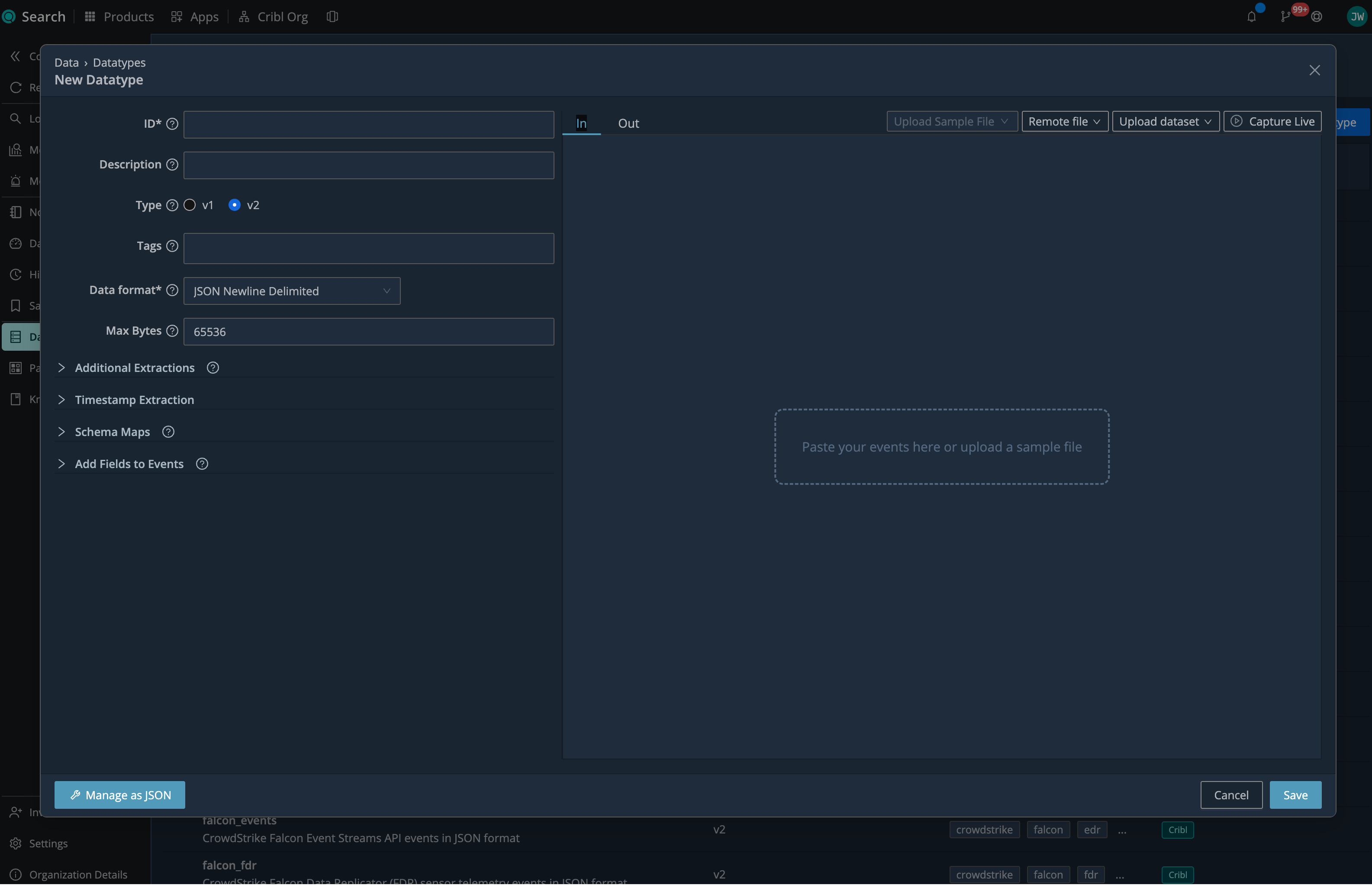
1. Describe
In the New Datatype modal:
- Set Type of your Datatype to v2.
- In ID, enter a unique identifier for your v2 Datatype (for example,
web_access_v2). Avoid spaces and special characters. - In Description, give an overview of your v2 Datatype, so you and others know what it’s for.
- In Tags, add keywords that might help you find your v2 Datatype later (for example,
web logs).
2. Set the Data Format
In Data format, specify how your incoming data is formatted:
- JSON Newline Delimited
- Delimited Text
- JSON Array
- Key-Value Pair
- Parquet
- Raw Text
- XML
For Splunk binary journal files, use the stock Splunk Journal (
splunk_journal) Datatype. Clone the stock Datatype to customize its timestamp extraction settings.
See the tabs below for examples and details.
Choose this data format if your data arrives as newline-delimited JSON, for example:
{"time":"2020-05-25T18:00:54.201Z","cid":"w1","channel":"clustercomm","level":"info","message":"metric sender","total":720,"dropped":0}
{"time":"2020-05-25T18:01:01.120Z","cid":"w1","channel":"clustercomm","level":"info","message":"metric sender","total":715,"dropped":2}Choose this data format if your incoming data is formatted as delimited text, for example, CSV:
time,cid,channel,level,message,total,dropped
2020-05-25T18:00:54.201Z,w1,clustercomm,info,metric sender,720,0
2020-05-25T18:01:01.120Z,w1,clustercomm,info,metric sender,715,2For the Delimited Text format, also set the following:
- Delimiter: The character that separates fields in the data.
- Quote: The character that surrounds quoted fields.
- Escape: The character that escapes special characters in the data.
- Null value: The value that represents a null field.
- Field list: A list of fields to include in the event.
- Contains header: Enable to use the first row as field names. If you also provide a Field list, the list overrides the header names. This setting is enabled by default.
Choose this data format if your incoming data is formatted as a JSON array, for example:
[
  {
    "time": "2020-05-25T18:00:54.201Z",
    "cid": "w1",
    "channel": "clustercomm",
    "level": "info",
    "message": "metric sender",
    "total": 720,
    "dropped": 0
  },
  {
    "time": "2020-05-25T18:01:01.120Z",
    "cid": "w1",
    "channel": "clustercomm",
    "level": "info",
    "message": "metric sender",
    "total": 715,
    "dropped": 2
  }
]Choose this data format if your incoming data is formatted as key-value pairs, for example:
time=2020-05-25T18:00:54.201Z,cid=w1,channel=clustercomm,level=info,total=720,dropped=0
time=2020-05-25T18:01:01.120Z,cid=w1,channel=clustercomm,level=info,total=715,dropped=2For the Key-Value Pair format, set the following:
- Delimiter: Specify the character that separates fields in your incoming data.
- Equals: Specify the character that separates keys and values.
Choose this data format if your incoming data is formatted as Parquet.
Choose this data format if your data is plain text that doesn’t fit any of the other formats, for example:
2025-10-12 09:15:32 ALERT user=jdoe action=login_failed from 10.1.2.3 (reason: bad password)
2025-10-12 09:15:33 INFO starting background sweep job
2025-10-12 09:15:34 WARNING cache nearly full (92%)Raw Text is common for free-form logs where you care about a few specific fields rather than a full schema.
Use Additional Extractions to define regex, key-value, delimited, JSON, or XML extractions for the fields you need.
Choose this data format if your incoming data is formatted as XML, for example:
<logs>
  <log>
    <time>2020-05-25T18:00:54.201Z</time>
    <cid>w1</cid>
    <channel>clustercomm</channel>
    <level>info</level>
    <message>metric sender</message>
    <total>720</total>
    <dropped>0</dropped>
  </log>
  <log>
    <time>2020-05-25T18:01:01.120Z</time>
    <cid>w1</cid>
    <channel>clustercomm</channel>
    <level>info</level>
    <message>metric sender</message>
    <total>715</total>
    <dropped>2</dropped>
  </log>
</logs>For the XML format, set the following:
- Keep attributes: Enable to preserve XML attributes in parsed events.
- Keep metadata: Enable to preserve XML metadata. Requires Keep attributes.
- Values to remove: Enter values to filter out. Elements that match any of those values get dropped.
- Transformer: Choose a preset to handle well-known XML formats:
- Windows Event: Flatten Windows Event Log XML into searchable fields.
- Apple P-list: Convert macOS plist XML into key-value pairs.
3. Set the Maximum Event Size
In Max Bytes, set the maximum size of a single event. You can set it from 1 up to about 128 MB (134217728
bytes). The default is 65536 (64 KB). This setting does not appear for the Parquet format.
If the accumulated event size reaches this limit before Cribl Search finds a break boundary, Cribl Search splits the
data into events of up to this size. Each full-size fragment has __isBroken set to true. If a leftover fragment is
smaller than the limit, Cribl Search emits it with __isBroken set to false.
4. Set Additional Extractions
Use Additional Extractions to run secondary parsers for extracting more fields or peeling layered payloads.
Select Add Parser Extraction, then configure:
- Name: Enter a name for the extraction.
- Extraction type: Select Delimited text, JSON, Key value pair, Regex, or XML.
- Source field: Enter the event field that contains the data to extract.
- Configure the settings for the selected extraction type. These settings match the corresponding options under Data format. For Regex, select Add Regular Expression, then enter a regex.
You can add up to five additional extractions.
Federated Search v2 supports up to five JSON, Regex, or Delimited text extractions for JSON Newline Delimited and Delimited Text data. It does not support Key value pair or XML additional extractions.
5. Set Timestamp Extraction
Configure how to find timestamps in your data.
Set the Extraction type:
- Auto: Tries to detect the timestamp automatically. Set Scan depth to how many characters to scan after the
anchor. Larger values are slower but may find timestamps farther into the event. The minimum is
2, and the default is150. - Manual: Provide the exact strptime format (for example,
%Y-%m-%dT%H:%M:%S.%LZ). Use when you know the exact format of your timestamps, and it’s consistent.
Then, configure these settings:
| Setting | Description |
|---|---|
Time field | Field from which to extract the timestamp (for example, _raw). Leave blank to scan the entire event. |
| Default timezone | Timezone to apply when the extracted timestamp has no timezone. The default is UTC. |
| Earliest timestamp allowed | Oldest acceptable timestamp relative to now (for example, -1y). Timestamps older than this are clamped to this value. The default, 0, allows timestamps back to Unix time 0 on January 1, 1970. |
| Future timestamp allowed | Newest acceptable timestamp relative to now (for example, +2d). Timestamps further in the future are clamped to this value. The default is +10years. |
| Timestamp anchor | Regex matching the text that immediately precedes the timestamp. Use $ to skip extraction. |
6. Normalize Field Names with Schema Maps
Map vendor-specific fields to the OCSF v1.8 schema while keeping the original fields for troubleshooting.
This feature is not supported for federated Datasets.
Under Schema Maps:
- In Schema, select OCSF v1.8.
- Under Mappings, provide a Source expression for each required OCSF Field. Cribl Search adds the required fields when you select the schema and supplies defaults where possible.
- To map more fields, select Add Field, then enter the target OCSF Field and a Source. The source can be an event field name or a KQL expression that returns the mapped value.
For example, this mapping sets the OCSF source IP field from the first populated source field:
| Field | Source |
|---|---|
src_endpoint.ip | coalesce(src_ip, client_ip) |
Stock Datatype schema mappings are read-only. To modify them, clone the stock Datatype and edit the clone.
7. Add Computed Fields
Enrich incoming events with new computed fields.
This feature is not supported for federated Datasets.
Under Add fields to events, select Add Field, and configure:
| Setting | Description |
|---|---|
| Field Name | Name for your new field. |
| Kusto Expression | KQL filter that computes the field’s value. |
Let’s say your source sends a text severity field and you want a single numeric risk_score on every event, for
alerting.
| Field Name | Kusto Expression |
|---|---|
risk_score | case(severity == "critical", 100, severity == "high", 80, severity == "medium", 50, 20) |
---in---
severity: "critical"

---out---
severity: "critical"
risk_score: 100Let’s say your events include a numeric dst_port and you want a short label such as web or admin, for grouping.
| Field Name | Kusto Expression |
|---|---|
destination.port_group | iif(dst_port in (80, 443), "web", iif(dst_port in (22, 3389), "admin", "other")) |
---in---
dst_port: 443

---out---
dst_port: 443
destination.port_group: "web"8. Test the Datatype with Sample Data
Use the In and Out tabs to check how the current Datatype settings parse events before you save.
- On the In tab, add sample data in one of these ways:
- Paste events into the input area.
- Choose a saved sample from Upload Sample File, or open the list and select Upload sample file to choose a local file.
- Drag a local sample file into the input area.
- Select Remote file to load a file from a Worker or Edge Node.
- Select Upload dataset to load events from a Dataset.
- Select Capture Live to capture events from a ready lakehouse engine. You can apply a KQL filter before you add the captured events.
- Select the Out tab to view up to 42 parsed events and their fields.
- Adjust the Datatype settings as needed. Cribl Search automatically updates the output.
The output reflects the current data format, additional extractions, timestamp extraction, schema maps, and computed fields.
You cannot test Parquet or Splunk Journal data in this panel.
Next Steps
Confirm with Save. Now, you’re ready to apply your custom v2 Datatype to your Datasets.
List of Stock v2 Datatypes
Cribl Search includes the following stock v2 Datatypes. Auto-Datatyping recognizes and parses most of them automatically.
| Log type | Datatype ID (datatype field added) | Source data format |
|---|---|---|
| Apache Combined logs | apache_httpd_accesslog_combined | Raw Text |
| Apache Common logs | apache_httpd_accesslog_common | Raw Text |
| AWS Application Load Balancer Log Fields | aws_alb_accesslog | Delimited Text |
| AWS CloudFront access logs | aws_cloudfront_accesslog | Delimited Text |
| AWS Config configuration item change notifications | aws_config | JSON Newline Delimited |
| AWS EC2 system logs (syslog with ISO 8601 prefix) | aws_ec2 | Raw Text |
| AWS EKS Kubernetes control plane audit logs in JSON format | aws_eks_audit | JSON Newline Delimited |
| AWS Classic Elastic Load Balancing Log Fields | aws_elb_accesslog | Delimited Text |
| AWS GuardDuty finding events in JSON format | aws_guardduty | JSON Newline Delimited |
| AWS Network Firewall logs (Suricata EVE JSON with AWS metadata) | aws_network_firewall | JSON Newline Delimited |
| AWS Network Load Balancer TLS access logs | aws_nlb_accesslog | Delimited Text |
| AWS RDS MySQL audit logs (MariaDB audit plugin format) | aws_rds_audit_mysql | Delimited Text |
| AWS RDS PostgreSQL pgAudit logs | aws_rds_audit_postgresql | Raw Text |
| AWS Route 53 public DNS query logs (space-delimited) | aws_route53_public | Delimited Text |
| AWS Route 53 Resolver query logs in JSON format | aws_route53_resolver | JSON Newline Delimited |
| AWS S3 server access logs | aws_s3_access | Raw Text |
| AWS Security Hub findings in ASFF format | aws_security_hub | JSON Newline Delimited |
| AWS VPC Flow Logs version 2 | aws_vpc_v2 | Delimited Text |
| AWS VPC Flow Logs version 5 | aws_vpc_v5 | Delimited Text |
| AWS WAF logs in JSON format | aws_waf_log_json | JSON Newline Delimited |
| Microsoft Azure Graph Security API alert events in JSON format | azure_graph_alerts | JSON Newline Delimited |
| Microsoft Azure Graph API device records in JSON format | azure_graph_devices | JSON Newline Delimited |
| Microsoft Azure Graph API directory audit logs in JSON format | azure_graph_directory_audits | JSON Newline Delimited |
| Microsoft Azure Graph API sign-in logs in JSON format | azure_graph_signins | JSON Newline Delimited |
| Microsoft Azure Graph API user authentication registration details in JSON format | azure_graph_user_registration | JSON Newline Delimited |
| Microsoft Azure Graph API user profile records in JSON format | azure_graph_users | JSON Newline Delimited |
| Azure Network Security Group (NSG) Flow Logs | azure_nsg_flowlog_json | JSON Newline Delimited |
| Check Point firewall logs in native key:“value”; semicolon-delimited format | checkpoint_firewall | Raw Text |
| Check Point firewall logs wrapped in RFC5424 syslog format | checkpoint_firewall_rfc_5424 | Raw Text |
| Cisco ASA syslog messages (ASA-* message IDs) with embedded event timestamp and various message formats | cisco_asa_syslog | Raw Text |
| Cisco eStreamer event logs (eNcore KVP format) | cisco_estreamer | Key-Value Pair |
| Cisco Firewall Services Module (FWSM) logs | cisco_fwsm_syslog | Raw Text |
| Cisco Firewall Services Module (FWSM) syslog events (connection build/teardown, translations, denies) | cisco_fwsm_v2 | Raw Text |
| Cisco IPS 4200 IDS/IPS alert events in comma-delimited key=value format | cisco_ips_alert | Key-Value Pair |
| Cisco NetFlow v9 records exported with a syslog-like prefix and comma-separated key=“value” pairs | cisco_netflow_v9 | Raw Text |
| Cloudflare Zero Trust Access authentication events from Logpush in JSON format | cloudflare_access_request | JSON Newline Delimited |
| Cloudflare account audit logs from Logpush in JSON format | cloudflare_audit | JSON Newline Delimited |
| Cloudflare firewall and WAF security events from Logpush in JSON format | cloudflare_firewall_event | JSON Newline Delimited |
| Cloudflare Zero Trust Gateway HTTP and network session logs from Logpush in JSON format | cloudflare_gateway | JSON Newline Delimited |
| Cloudflare Zero Trust Gateway DNS query logs from Logpush in JSON format | cloudflare_gateway_dns | JSON Newline Delimited |
| Cloudflare CDN HTTP request logs from Logpush in JSON format | cloudflare_http_request | JSON Newline Delimited |
| Cloudflare Workers trace events from Logpush in JSON format | cloudflare_workers_trace | JSON Newline Delimited |
| Cloudflare Zero Trust network session telemetry from Logpush in JSON format | cloudflare_zero_trust_network_session | JSON Newline Delimited |
| AWS CloudTrail digest files for log validation | cloudtrail_digest | JSON Newline Delimited |
| AWS CloudTrail event logs in JSON format | cloudtrail_event | JSON Newline Delimited |
| Confluent Cloud Kafka audit log events following CloudEvents v1.0 spec in JSON format | confluent_audit | JSON Newline Delimited |
| Cribl internal process logs in JSON format | cribl_internal_logs | JSON Newline Delimited |
| Cribl Stream metrics data in JSON format | cribl_metrics | JSON Newline Delimited |
| Cribl Lake Dataset objects stored as Apache Parquet | cribl_lake_parquet | Parquet |
| Exabeam Common Information Model (CIM) normalized events in JSON format | exabeam_cim | JSON Newline Delimited |
| CrowdStrike Falcon Event Streams API events in JSON format | falcon_events | JSON Newline Delimited |
| CrowdStrike Falcon Data Replicator (FDR) sensor telemetry events in JSON format | falcon_fdr | JSON Newline Delimited |
| CrowdStrike Falcon Data Replicator (FDR) host/asset info records in JSON format | falcon_fdr_aidmaster | JSON Newline Delimited |
| CrowdStrike Falcon Data Replicator (FDR) external API events in JSON format | falcon_fdr_external_api | JSON Newline Delimited |
| CrowdStrike Falcon REST API alert events in JSON format | falcon_rest_alerts | JSON Newline Delimited |
| CrowdStrike Falcon Hosts API device inventory events in JSON format | falcon_rest_devices | JSON Newline Delimited |
| CrowdStrike Falcon Spotlight API vulnerability assessment events in JSON format | falcon_rest_vulnerabilities | JSON Newline Delimited |
| Fortinet FortiGate firewall logs in key=value format (FortiOS traffic/utm/event). | fortinet_fortigate_syslog | Key-Value Pair |
| Fortinet FortiGate firewall logs wrapped in a syslog PRI header followed by FortiOS key=value pairs. | fortinet_fortigate_syslog_wrapped | Raw Text |
| GCP Cloud Audit Logs in JSON format | gcp_audit_logs | JSON Newline Delimited |
| GCP VPC Firewall Rules Logs in JSON format | gcp_firewall | JSON Newline Delimited |
| GCP VPC Flow Logs in JSON format | gcp_vpc_flow | JSON Newline Delimited |
| Generic CSV data | generic_csv | Delimited Text |
| Generic space-delimited key=value pairs | generic_kvp | Key-Value Pair |
| Generic metrics data | generic_metrics | Raw Text |
| Generic NDJSON data | generic_ndjson | JSON Newline Delimited |
| Generic tab-separated values | generic_tsv | Delimited Text |
| Generic XML content | generic_xml | XML |
| GitLab audit events from audit_json.log file for DevOps activity in JSON format | gitlab_audit_log | JSON Newline Delimited |
| GitLab audit events via streaming (HTTP webhook) for DevOps activity in JSON format | gitlab_audit_streaming | JSON Newline Delimited |
| Gong Revenue Intelligence Platform audit logs (UserActivityLog and AccessLog) in JSON format | gong_audit | JSON Newline Delimited |
| Google Workspace Activity Reports in JSON format | gws_activity_reports | JSON Newline Delimited |
| Google Workspace Alert Center alerts in JSON format | gws_alerts | JSON Newline Delimited |
| IBM AIX audit log events (AIX audit subsystem) | ibm_aix_audit | Raw Text |
| IBM Db2 audit CONTEXT events recording SQL statements and database operations such as COMMIT, ROLLBACK, CONNECT, and EXECUTE. | ibm_db2_audit_context | Delimited Text |
| IBM Db2 audit OBJMAINT events recording object maintenance actions such as CREATE_OBJECT, DROP_OBJECT, and RENAME_OBJECT. | ibm_db2_audit_objmaint | Delimited Text |
| IBM Db2 audit SECMAINT events recording security maintenance actions such as GRANT, REVOKE, and IMPLICIT_GRANT of privileges and authorities. | ibm_db2_audit_secmaint | Delimited Text |
| IBM Db2 audit SYSADMIN events recording system administration actions such as DB2SET, DB2AUDIT, START_DB2, STOP_DB2, and GET_SNAPSHOT. | ibm_db2_audit_sysadmin | Delimited Text |
| IBM Db2 audit VALIDATE events recording authentication and user validation activities such as AUTHENTICATION, CHECK_GROUP_MEMBERSHIP, and GET_USERID. | ibm_db2_audit_validate | Delimited Text |
| IBM i (OS/400) logs in syslog-like format with key/value pairs | ibm_os400_syslog | Raw Text |
| IBM z/OS (OS/390) RACF audit events in syslog format with key-value payload | ibm_racf_syslog | Raw Text |
| Imperva SecureSphere Database Activity Monitor logs in CEF format with syslog prefix | imperva_dam | Raw Text |
| Imperva Incapsula Cloud WAF logs in CEF format | imperva_incapsula_waf | Raw Text |
| Infoblox logs in CEF (Common Event Format) format | infoblox_cef | Raw Text |
| Infoblox logs in CEF format with RFC 5424 syslog header | infoblox_cef_rfc5424 | Raw Text |
| Infoblox logs in LEEF (Log Event Extended Format) format | infoblox_leef | Raw Text |
| Infoblox logs in LEEF format with RFC 5424 syslog header | infoblox_leef_rfc5424 | Raw Text |
| Infoblox DNS/DHCP appliance logs in standard syslog format | infoblox_syslog | Raw Text |
| Infoblox DNS/DHCP appliance logs in BSD syslog format without PRI header | infoblox_syslog_bsd_nopri | Raw Text |
| Infoblox DNS/DHCP appliance logs with ISO 8601 timestamps | infoblox_syslog_iso8601 | Raw Text |
| ISC BIND9 named DNS query logs | isc_bind_query | Raw Text |
| Linux auditd events (audit logs) including PATH, AVC, SERVICE_START, and CRED_ACQ records | linux_auditd_log | Raw Text |
| Microsoft DHCP Server events forwarded as MSWinEventLog syslog with tab-delimited payload | microsoft_dhcp_syslog | Raw Text |
| Microsoft Windows DNS Server Service events in key=value style Windows Event Log export format | microsoft_dns_server_eventlog | Raw Text |
| Microsoft IIS 7.5 W3C HTTP access logs (space-delimited fields) | microsoft_iis_accesslog | Delimited Text |
| Microsoft Windows Event Log (classic format) | microsoft_windows_eventlog_classic | Raw Text |
| Microsoft Windows Event Log (XML format) | microsoft_windows_eventlog_xml | XML |
| MySQL/MariaDB server audit log in CSV format (timestamp, server host, user, client host, connection id, query id, operation, database, object/query, return code) | mysql_server_audit | Delimited Text |
| n8n workflow automation log streaming events in JSON format | n8n_log_streaming | JSON Newline Delimited |
| NetApp filer cfoa event logs (weekday/month/day/time/tz prefix with bracketed cfoa event and severity) | netapp_filer_cfoa | Raw Text |
| NetApp log messages with leading weekday timestamp and bracketed event key and severity | netapp_filer_syslog | Raw Text |
| Netskope alert events (DLP, malware, malicious site, policy) in JSON/NDJSON format | netskope_alert_json | JSON Newline Delimited |
| Netskope event logs (page, application, audit, infrastructure) in JSON/NDJSON format | netskope_event_json | JSON Newline Delimited |
| nginx access logs in combined (remote_addr - remote_user [time] “request” status bytes “referer” “user_agent”) format | nginx_accesslog | Raw Text |
| Open Cybersecurity Schema Framework (OCSF) events in JSON format | ocsf | JSON Newline Delimited |
| Okta System Log events in JSON format | okta_system_log | JSON Newline Delimited |
| OpenAI organization audit logs in JSON format | openai_audit | JSON Newline Delimited |
| OpenAI API completions usage data in JSON format | openai_completions | JSON Newline Delimited |
| OpenAI organization cost data in JSON format | openai_costs | JSON Newline Delimited |
| OpenAI organization project data in JSON format | openai_projects | JSON Newline Delimited |
| OpenAI organization user data in JSON format | openai_users | JSON Newline Delimited |
| Palo Alto authentication logs in CSV format | pan_authentication_csv | Delimited Text |
| Palo Alto authentication logs in syslog format | pan_authentication_syslog | Raw Text |
| Palo Alto authentication logs in syslog format without PRI header | pan_authentication_syslog_nopri | Raw Text |
| Palo Alto config logs in CSV format | pan_config_csv | Delimited Text |
| Palo Alto config logs in syslog format | pan_config_syslog | Raw Text |
| Palo Alto config logs in syslog format without PRI header | pan_config_syslog_nopri | Raw Text |
| Palo Alto correlation logs in CSV format | pan_correlation_csv | Delimited Text |
| Palo Alto correlation logs in syslog format | pan_correlation_syslog | Raw Text |
| Palo Alto correlation logs in syslog format without PRI header | pan_correlation_syslog_nopri | Raw Text |
| Palo Alto GlobalProtect logs in CSV format | pan_globalprotect_csv | Delimited Text |
| Palo Alto GlobalProtect logs in syslog format | pan_globalprotect_syslog | Raw Text |
| Palo Alto GlobalProtect logs in syslog format without PRI header | pan_globalprotect_syslog_nopri | Raw Text |
| Palo Alto HIP match logs in CSV format | pan_hipmatch_csv | Delimited Text |
| Palo Alto HIP match logs in syslog format | pan_hipmatch_syslog | Raw Text |
| Palo Alto HIP match logs in syslog format without PRI header | pan_hipmatch_syslog_nopri | Raw Text |
| Palo Alto IP tag logs in CSV format | pan_iptag_csv | Delimited Text |
| Palo Alto IP tag logs in syslog format | pan_iptag_syslog | Raw Text |
| Palo Alto IP tag logs in syslog format without PRI header | pan_iptag_syslog_nopri | Raw Text |
| Palo Alto system logs in CSV format | pan_system_csv | Delimited Text |
| Palo Alto system logs in syslog format | pan_system_syslog | Raw Text |
| Palo Alto system logs in syslog format without PRI header | pan_system_syslog_nopri | Raw Text |
| Palo Alto threat logs in CSV format | pan_threat_csv | Delimited Text |
| Palo Alto threat logs in syslog format | pan_threat_syslog | Raw Text |
| Palo Alto threat logs in syslog format without PRI header | pan_threat_syslog_nopri | Raw Text |
| Palo Alto traffic logs in CSV format | pan_traffic_csv | Delimited Text |
| Palo Alto traffic logs in syslog format | pan_traffic_syslog | Raw Text |
| Palo Alto traffic logs in syslog format without PRI header | pan_traffic_syslog_nopri | Raw Text |
| Palo Alto tunnel logs in CSV format | pan_tunnel_csv | Delimited Text |
| Palo Alto tunnel logs in syslog format | pan_tunnel_syslog | Raw Text |
| Palo Alto tunnel logs in syslog format without PRI header | pan_tunnel_syslog_nopri | Raw Text |
| Proofpoint PPS native logs with full-month timestamps and space-delimited key=value fields | proofpoint_pps_log | Raw Text |
| Proofpoint PPS module/filter logs with ISO timestamps and process names | proofpoint_pps_module | Raw Text |
| Proofpoint PPS sendmail/MTA queue logs with comma-delimited fields | proofpoint_pps_sendmail | Raw Text |
| Proofpoint TAP click events in JSON format | proofpoint_tap_clicks | JSON Newline Delimited |
| Proofpoint TAP message events in JSON format | proofpoint_tap_messages | JSON Newline Delimited |
| Proofpoint TAP events in RFC5424 syslog format | proofpoint_tap_rfc5424 | Raw Text |
| Salesforce Event Log File ApexCallout events in CSV format | salesforce_eventlogfile_callout | Delimited Text |
| Salesforce Event Log File ApexExecution events in CSV format | salesforce_eventlogfile_execution | Delimited Text |
| Salesforce Event Log File ApexRestApi events in CSV format | salesforce_eventlogfile_restapi | Delimited Text |
| Salesforce Login History records in JSON format | salesforce_loginhistory | JSON Newline Delimited |
| Salesforce Setup Audit Trail records in JSON format | salesforce_setupaudittrail | JSON Newline Delimited |
| SentinelOne Cloud Funnel v1 EDR telemetry events in JSON format | sentinelone_cloudfunnel_v1 | JSON Newline Delimited |
| SentinelOne Cloud Funnel v2 EDR telemetry events in flat JSON format | sentinelone_cloudfunnel_v2 | JSON Newline Delimited |
| Slack Workspace Audit Logs from the Slack Audit Logs API in JSON format | slack_audit | JSON Newline Delimited |
| Splunk binary journal files | splunk_journal | Splunk Journal |
| Snort IDS/IPS alert logs in Snort fast alert format (non-syslog) | snort_alert_full | Raw Text |
| Snort IDS/IPS alert logs in syslog format | snort_alert_syslog | Raw Text |
| Squid proxy access.log events (default native format) | squid_access | Raw Text |
| IBM z/OS SMF records exported by Syncsort in JSON format (multiple SMF record types) | syncsort_zos_smf | JSON Newline Delimited |
| IBM z/OS SMF type 80 RACF security audit records exported by Syncsort in JSON format | syncsort_zos_smf_racf | JSON Newline Delimited |
| IBM z/OS SYSLOG records exported by Syncsort in JSON format | syncsort_zos_syslog | JSON Newline Delimited |
| Syslog RFC 3164 format | syslog_rfc3164 | Raw Text |
| Syslog RFC 5424 format | syslog_rfc5424 | Raw Text |
| HashiCorp Terraform Enterprise audit log events for infrastructure changes in JSON format | terraform_enterprise_audit | JSON Newline Delimited |
| Trellix EDR endpoint detection events in JSON format | trellix_edr_event | JSON Newline Delimited |
| Trellix ePO device inventory data in JSON format | trellix_epo_device | JSON Newline Delimited |
| Trellix ePO security events in JSON format | trellix_epo_event | JSON Newline Delimited |
| Trellix ePO group hierarchy data in JSON format | trellix_epo_group | JSON Newline Delimited |
| Trellix ePO syslog events in XML format | trellix_epo_syslog_xml | XML |
| Ubiquiti UniFi access point logs (mcad, hostapd, wevent, kernel) | unifi_other | Raw Text |
| Ubiquiti UniFi station tracking daemon (stahtd) logs with STA_ASSOC_TRACKER events | unifi_stahtd | Raw Text |
| VMware NSX FABRIC logs in RFC5424 syslog format with NSX structured data | vmware_nsx_fabric_rfc | Raw Text |
| VMWare NSX Firewall logs in RFC5424 syslog format with NSX structured data and firewall packet message fields | vmware_nsx_firewall_syslog | Raw Text |
| VMware NSX ROUTING logs in RFC5424 syslog format with NSX structured data | vmware_nsx_routing_rfc | Raw Text |
| VMware NSX SYSTEM logs in RFC5424 syslog format with NSX structured data | vmware_nsx_system_rfc | Raw Text |
| WordPress activity logs from WP Activity Log plugin in JSON format | wordpress_activity_log | JSON Newline Delimited |
| Workday user activity logs from the Activity Logging API in JSON format | workday_activity | JSON Newline Delimited |
| Workday sign-on and authentication logs in JSON format | workday_signon | JSON Newline Delimited |
| Zeek (Bro) network security monitor logs in JSON/NDJSON format | zeek_json | JSON Newline Delimited |
| Zeek (Bro) network security monitor logs in TSV format | zeek_tsv | Delimited Text |
| Zscaler Internet Access (ZIA) NSS alert messages in syslog format | zia_alerts | Raw Text |
| Zscaler Internet Access (ZIA) firewall logs in CSV format | zia_csv | Delimited Text |
| Zscaler Internet Access (ZIA) web logs in JSON format with nested event object | zia_json | JSON Newline Delimited |
| Zscaler Internet Access (ZIA) firewall logs in TSV format | zia_tsv | Delimited Text |
| Zscaler Private Access (ZPA) App Connector status logs in JSON format | zpa_app_connector | JSON Newline Delimited |
| Zscaler Private Access (ZPA) audit logs in JSON format | zpa_audit | JSON Newline Delimited |
| Zscaler Private Access (ZPA) Browser Access logs in JSON format | zpa_browser_access | JSON Newline Delimited |
| Zscaler Private Access (ZPA) user activity logs in JSON format | zpa_user_activity | JSON Newline Delimited |
| Zscaler Private Access (ZPA) user status logs in JSON format | zpa_user_status | JSON Newline Delimited |
The following stock v2 Datatypes don’t apply automatically:
aws_ec2,generic_csv,generic_kvp,generic_tsv, andgeneric_xml: Assign them with your own Datatype rules.cribl_lake_parquetandsplunk_journal: Use them with federated Cribl Lake Datasets. See Dataset Type and Datatypes for Lake Datasets.