





Connect Cribl Search to Cribl Lake
Configure Cribl Search to query your Cribl Lake data.
Cribl Lake Datasets work as Cribl Search Datasets out-of-the-box, so you can instantly start searching them.
To ingest data directly into Cribl Search for fast, schema-aware searches, see Get Data In in Cribl Search.
Where you need direct ownership of your data, for compliance or other purposes, you can use Storage Locations to create Lake Datasets directly on Amazon S3 or Azure Blob Storage. You can choose the storage class or access tier that Cribl Lake uses when writing objects; S3 Datasets default to the Standard storage class, and Azure Datasets default to the Inferred access tier.
For more information about Lake, see the Cribl Lake docs.
Federated Search: Dataset Types v1 and v2
Lake-backed Search uses Dataset Type v1 or v2 on a Federated Dataset tied to the Lake Dataset Provider
(cribl_lake or equivalent). Dataset Type v2 supports newline-delimited JSON, Parquet, and DDSS objects in Lake
storage.
Use Dataset Type and Datatypes for Lake Datasets for configuration steps. For limits and migration, see federated search v2.
Add a Cribl Lake Dataset Provider
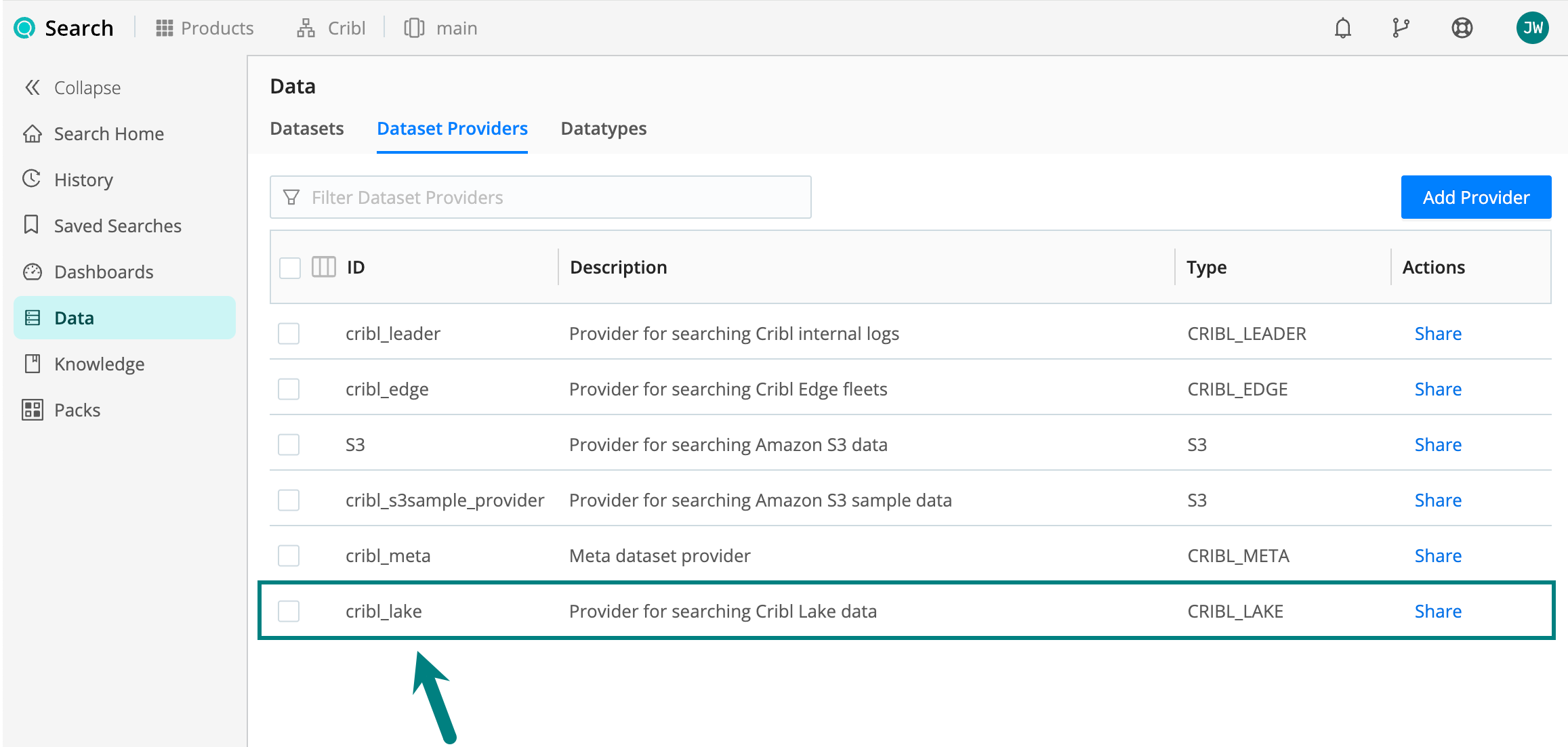
Cribl Search comes with a preconfigured Dataset Provider for Cribl Lake (called cribl_lake), so you don’t need to add
it explicitly.
You can see it by going to Products (on the top bar) > Search > Data > Dataset Providers.
Add a Cribl Lake Dataset
Create the Lake Dataset in the Cribl Lake UI first. See Create a New Lake Dataset.
In Cribl Search, add or select the matching Federated Dataset to set Dataset Type and, on Type v2, the Datatype for each data format. See Dataset Type and Datatypes for Lake Datasets.
Dataset Type and Datatypes for Lake Datasets
Add or Edit a Lake Dataset
- Select Products > Search > Data > Datasets.
- Select an existing Lake-backed Dataset, or select Add Dataset to create one.
- Under Dataset kind, select Federated Dataset (for data hosted in Cribl Lake).
- Set Dataset Provider to your Lake provider.
Set Dataset Type (v1 or v2)
Set Type to v1 or v2.
To switch an existing Lake Dataset to Dataset Type v2, change Type to v2 on that Dataset, set a Datatype for each data format, then select Save. Lake Datasets can’t be cloned. See Switch a Federated Dataset from v1 to v2.
Configure Datatypes for v2 Datasets
Lake Datasets don’t use the Filters table that Amazon S3 and Azure Blob Storage Datasets use. Cribl Search already knows how Cribl Lake lays out and names objects, so a Lake Dataset has no Bucket path, Region, Partitioning scheme, or Filter glob to set.
Instead, when you set Type to v2, Cribl Search shows a Datatypes table. Each row pairs:
- Data Format: Read-only. This is the storage format of the Lake Dataset:
JSON,Parquet, orSplunk DDSS. - Datatype ID: A drop-down that lists only the Datatypes that can parse that data format.
Cribl Search adds the first row for you, based on the Lake Dataset’s own storage format:
- JSON Lake Dataset: Data Format
JSON, defaulting to thegeneric_ndjsonDatatype. - Parquet Lake Dataset: Data Format
Parquet, defaulting to thecribl_lake_parquetDatatype. - DDSS Lake Dataset: Data Format
Splunk DDSS, defaulting to thesplunk_journalDatatype. See Dataset Type v2 and DDSS.
You can change Datatype ID on any row, including to a clone of the stock Datatype.
If a JSON or Parquet Lake Dataset holds both formats, select Add Data Formats and choose the other format. This adds a second row, which is the maximum. You can delete the added row, but not the row that matches the Lake Dataset’s own storage format.
Select Save.
For Parquet-backed events, Cribl Search reads _time from the column named in the Datatype’s timestamp extraction
settings. The stock cribl_lake_parquet Datatype reads the _time column. Other Parquet columns become event fields of
the same name, including host and sourcetype.
Columns whose names collide with a Cribl Search reserved field (_raw, _time, source, dataset, or datatype)
appear with a data_ prefix. For example, a Parquet column named source becomes data_source, because the event’s
own source field holds the path of the Lake object that contains the event.
Dataset Type v2 and DDSS
DDSS Lake Datasets support Dataset Type v2. Because Cribl Search discovers Splunk journal files structurally,
the Datatypes table shows a single row with the Data Format Splunk DDSS:
- Set Type to
v2. - Set Datatype ID to the stock
Splunk JournalDatatype,splunk_journal, or to a clone of that Datatype. The drop-down lists only Datatypes that use the Splunk Journal data format. - Select Save.
A DDSS Lake Dataset has no Add Data Formats button, so you can’t add a second data format row. For the Lake Dataset itself, see Splunk Cloud Self Storage (DDSS) Direct Access.
Send Cribl Search Results to Cribl Lake
After you create a Dataset in Cribl Lake, you can send Cribl Search
results to it, using the export operator. Here is a simple example:
// export Cribl Search results to an existing Lake Dataset
dataset="cribl_search_sample"
| export to myLakeDataset(You can find more export examples here.)
Typically, you’re exporting data in which Cribl Search has already parsed field names and values. Parsed fields improve search efficiency when you query the Lake Dataset later.
Search a Cribl Lake Dataset
You can query your Lake Datasets just like any other Search Datasets. See Searching Cribl Lake for some query examples.