





Ingest Cribl Stream/Edge Data into Cribl Search
Collect data from your on-prem or Cribl.Cloud tenants to store it in Cribl Search for fast analysis.
Before You Begin
You’ll need:
- Search Admin Permission, or higher. Learn who can do what at Cribl Search Permissions.
- Cribl Stream or Cribl Edge (on-prem or Cribl.Cloud).
- Cribl.Cloud Enterprise on both sides (Cribl Stream/Edge and Cribl Search). For details, see Pricing.
If you don’t need Cribl Stream or Edge processing, you can send data directly to a lakehouse engine, using native Cribl Search Sources such as Syslog, Splunk HEC, OpenTelemetry, or Raw HTTP. Search also parses incoming events through Auto-Datatyping and Custom Datatypes v2, so in many cases you’re better off skipping Stream or Edge pre-processing altogether. For why this matters, see Ingest Is Measured at the Engine.
Looking for the Cribl HTTP Source in Cribl Stream instead?
1. Add a Lakehouse Engine
See Lakehouse Engines in Cribl Search.
2. Set Up Your Search Datasets
Create the Search Datasets you’ll route events into, and set their retention. See Create Search Datasets.
3. Add a Cribl HTTP Source in Cribl Search
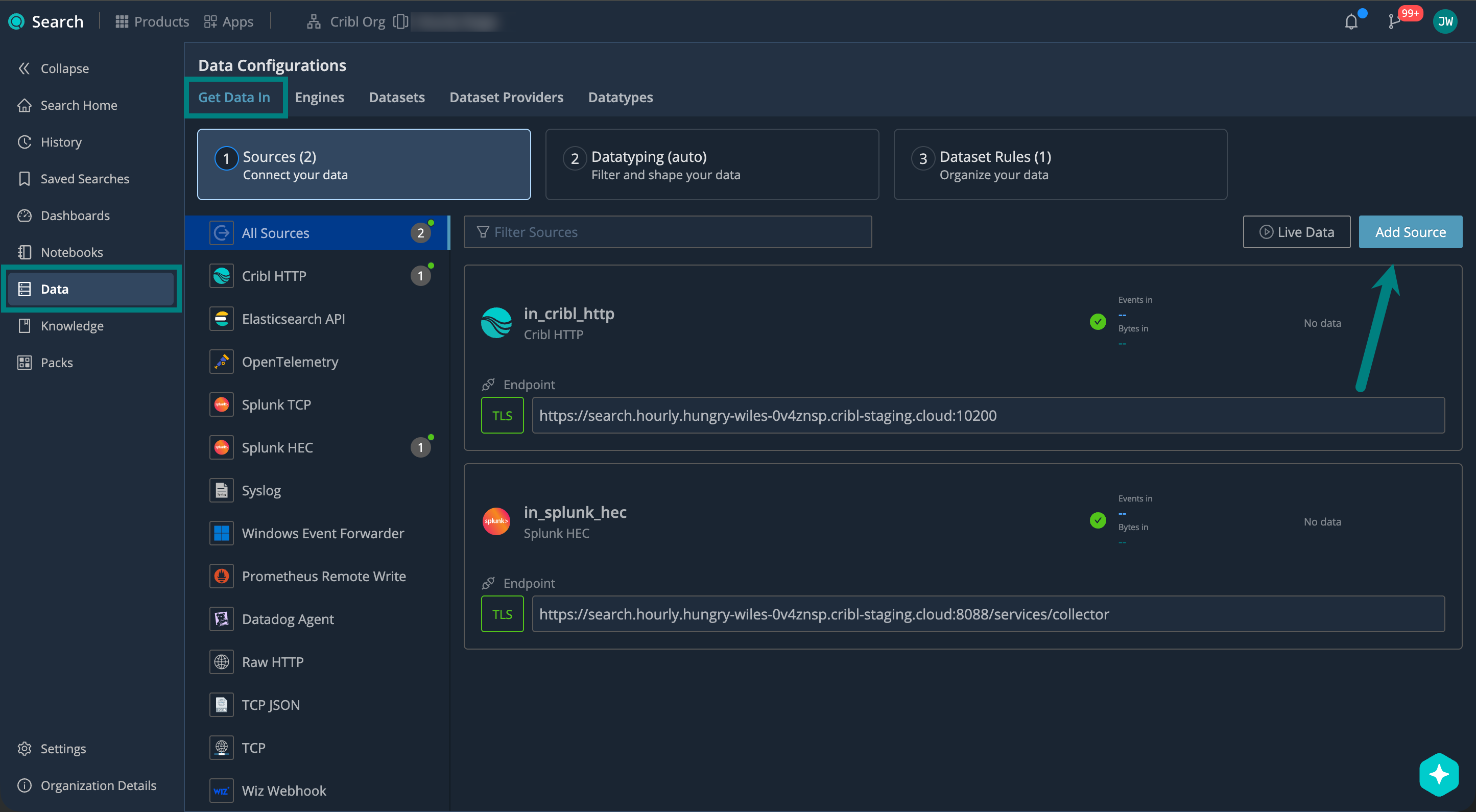
On the Cribl.Cloud top bar, select Products > Search > Data > Get Data In > Add Source > Cribl HTTP.
Describe Your Source
Under General, configure:
| Setting | Description | Example |
|---|---|---|
| ID | Source ID, unique across your Cribl.Cloud Workspace. Use letters, numbers, underscores, hyphens. | cribl_stream_prod |
| Description | Describe your Source so others know what it’s for. | Ingests data from Cribl Stream |
| Address | Hostname (FQDN) that Cribl Stream/Edge connects to (Cribl endpoint). | search.main.foo-bar-abc123.cribl.cloud |
| Port | Network port to listen on. Keep the default unless it conflicts with another service. | 10200 (default) |
Set up Authentication (Optional)
For cross-environment or cross-Workspace paths (for example, on-prem Cribl Stream to Cribl Search), you’ll need to set up authentication tokens.
Under Authentication, select Add Token. Add as many tokens as you need.
| Setting | Description | Example |
|---|---|---|
Token secret (text secret) | Reference to a stored secret containing the token. Select a secret or Create a new one. (See Create and Manage Secrets in Cribl Stream). | sec_cribl_stream_token |
| Description | Describe which clients or environments use the token. | Prod Cribl Stream |
Set Up Encryption
Use TLS encryption to protect your data in transit.
TLS must be enabled on both sides (Source and Destination), or disabled on both sides.
Under Encrypt, select Enabled, and set the Minimum TLS version you want to accept.
| TLS Version | When to Use |
|---|---|
| 1.3 | Recommended. Provides the best security. |
| 1.2 | Use only when connecting to older systems that don’t support TLS 1.3. |
| Older than 1.2 | Avoid if possible. These versions are no longer considered secure. |
Select Save to create the Source.
4. Assign Datatypes in Cribl Stream
When data comes from Cribl Stream or Cribl Edge, you can skip Datatyping in Cribl Search, and assign Datatypes upstream. Set the datatype override field to a stock or custom v2 Datatype.
If events are already fully parsed upstream (fields are on the event and you don’t want Search to parse _raw again), set the isParsed override field. Remember to set datatype too, otherwise Auto-Datatyping kicks in.
The easiest way to set both datatype and isParsed is to add a Parser Function with Type set to Auto to the Pipeline that feeds your Cribl Search Destination. Toggle on Tag events with datatype and isParsed to set both fields automatically.
You can also set these fields manually with an Eval function in the same Pipeline.
If you’d rather configure Datatyping in Cribl Search instead, see Shape Your Data with Datatype Rules.
5. Route Events to Search Datasets
After you create your Search Datasets, assign each event to a Dataset upstream by setting the dataset
override field in Cribl Stream or Cribl Edge. Search uses that value directly and skips Dataset
rules.
- In Cribl Search, add your Search Datasets and set their retention periods.
- In Cribl Stream or Cribl Edge, set the
datasetfield on each event to the ID of the target Search Dataset. Use an Eval function in the Pipeline that feeds your Cribl Search Destination.
Events with no dataset field, or with a dataset field pointing to a Dataset that doesn’t exist, fall back to the
main Dataset.
If you’d rather route events with Dataset rules in Cribl Search, see Organize Your Data with Dataset Rules.
6. Add a Cribl Search Destination in Cribl Stream or Cribl Edge
For Cribl Stream, see Cribl Search Destination in the Stream docs.
For Cribl Edge, see Cribl Search Destination in the Edge docs.
7. Start Sending Data and Verify
Start sending events from Cribl Stream or Cribl Edge, and verify that they’re successfully flowing into Cribl Search.
On the Cribl.Cloud top bar, select Products > Search > Data > Live Data.
Here, check for your Cribl HTTP Source. For details, see Live Data.
Next Steps
Now that your data is in Cribl Search, you can start using it. For example: