


Learn About StreamAI
StreamAI is an AI gateway from Cribl. It centralizes your company’s large language model (LLM) API traffic in Cribl. Instead of pointing each application at an individual model provider, you route requests through a Cribl-managed AI Gateway. In Cribl.Cloud, you can use StreamAI as the custom AI provider that powers Cribl AI. See Use StreamAI as a Custom AI Provider for Cribl AI.
When teams use different providers and different credentials, it’s hard to see, secure, or control how your company uses AI. With StreamAI, you can:
- Issue a separate client key to each client, and revoke a key without affecting other clients.
- Send requests to
cribl/auto, and let StreamAI choose the model. See Auto Mode. - See token usage and estimated cost for each key. See Monitor StreamAI Usage.
- Capture completed requests and responses, and export them as OpenTelemetry traces to a receiver that you configure. See Export Inference Traces.
Each Cribl.Cloud Workspace has one AI Gateway. That gateway serves any number of client keys. To set up your gateway and connect it to Cribl AI, see Get Started with StreamAI.
Capabilities and Limits
StreamAI routes requests through cribl/auto, manages client keys, and reports usage and traces. It has the following limits.
- Models: StreamAI rejects any model other than
cribl/auto. See Auto Mode. - Usage limits: You can’t set a usage limit. Cribl applies a request limit to each Organization, and requests over the limit return a
429error. To see how much a key used, see Monitor StreamAI Usage. - Usage by model: StreamAI reports usage and estimated cost for each key, not for each model.
StreamAI currently supports automatic smart routing at no additional cost for Cribl AI features, apps, and agents built on the Cribl platform. The costs that StreamAI shows are estimates at list price, and Cribl doesn’t bill them.
StreamAI is separate from Cribl AI. Cribl AI provides in-product assistants that run on a configured AI provider. StreamAI routes LLM traffic through a Cribl-managed gateway. You can configure StreamAI as the custom AI provider that powers Cribl AI. See Use StreamAI as a Custom AI Provider for Cribl AI.
How StreamAI Works
StreamAI separates the control plane from the data plane. The control plane manages the gateway, and the data plane carries your inference traffic.
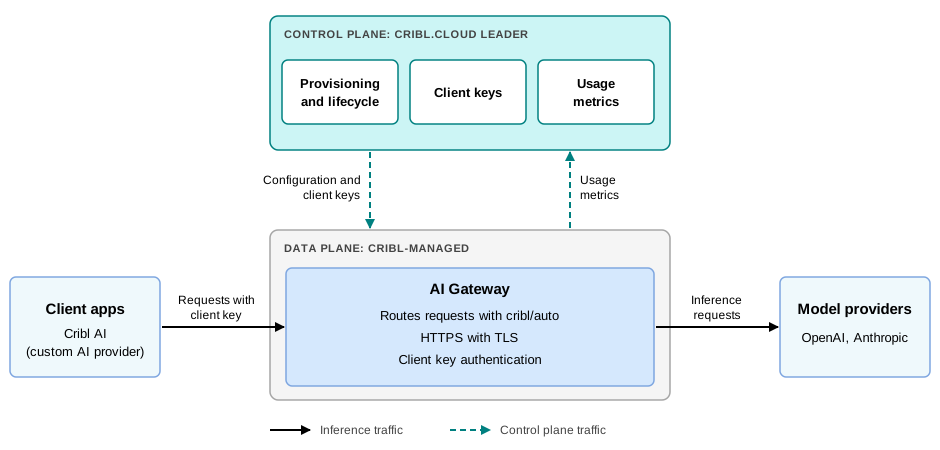
Control Plane
The Cribl.Cloud Leader is the control plane. It:
- Provisions the gateway and manages its lifecycle.
- Stores your client keys and deploys them to the gateway.
- Receives usage reports from the gateway and records each key’s token usage and estimated cost.
Inference traffic doesn’t pass through the Leader.
Data Plane
The gateway is the data plane. Cribl runs and manages the gateway for your Workspace, so you don’t create, size, or configure its infrastructure. The gateway runs as the stream-ai Worker Group, and its Workers process your inference requests.
When a client sends a request, the gateway:
- Authenticates the client key. The gateway rejects requests that don’t include a valid key.
- Checks the model. The gateway rejects any request for a model other than
cribl/auto. - Forwards the request to the model, and returns the response to the client.
- Records the token usage and estimated cost for the request, and reports them to the Leader. The cost is an estimate at list prices, not a bill. For how StreamAI calculates it, see How StreamAI Estimates Cost.
The gateway runs these checks on every request, before it forwards anything. A rejected request never reaches the model. For the responses that the gateway returns when it rejects a request, see Error Response Format.
The gateway chooses the model for a cribl/auto request, and it sends the request under the name that the model’s provider uses. The gateway replaces the value of the top-level model property with the provider’s name. The gateway doesn’t change anything else in the request body, with one exception: For a streamed Chat Completions request, the gateway sets stream_options.include_usage to true so that it can count tokens. The client always receives a final chunk that contains the token usage, even if the request sets include_usage to false. Some SDKs surface that chunk.
Auto Mode
Send cribl/auto as the model. StreamAI rejects any other model.
cribl/auto is a virtual model name. When a client sends cribl/auto, the gateway chooses the model. For each endpoint, the gateway has ordered lists of models, and it uses the list that applies to the request. It sends the request to the first model on that list. If that model answers with a 404, 429, or 503 status before the gateway sends anything to the client, the gateway discards the answer and tries the next model. It tries at most 6 models. If every model fails, the gateway returns the last answer to the client. The gateway doesn’t retry other statuses, timeouts, or connection errors.
The gateway prices a cribl/auto request at the model that answered, not at cribl/auto.
Availability
StreamAI has the following availability requirements.
- Deployment: StreamAI is available only in commercial Cribl.Cloud. It’s not available in Cribl.Cloud Government or in on-prem deployments.
- Entitlement: Your Workspace must have StreamAI enabled. StreamAI is available to Enterprise customers only.
- Provisioning: An Organization Admin, Organization Owner, Workspace Admin, or Workspace Owner provisions the gateway for the Workspace. Provisioning can take several minutes.
- Scope: Each Workspace has one AI Gateway.