





Configuration Files
Configuration files store the configuration changes locally on your system. They reflect the changes you make to configuration settings in the UI.
You can preview how settings are translated into configuration changes in the Git Changes modal whenever you commit your changes via the Version Control option.
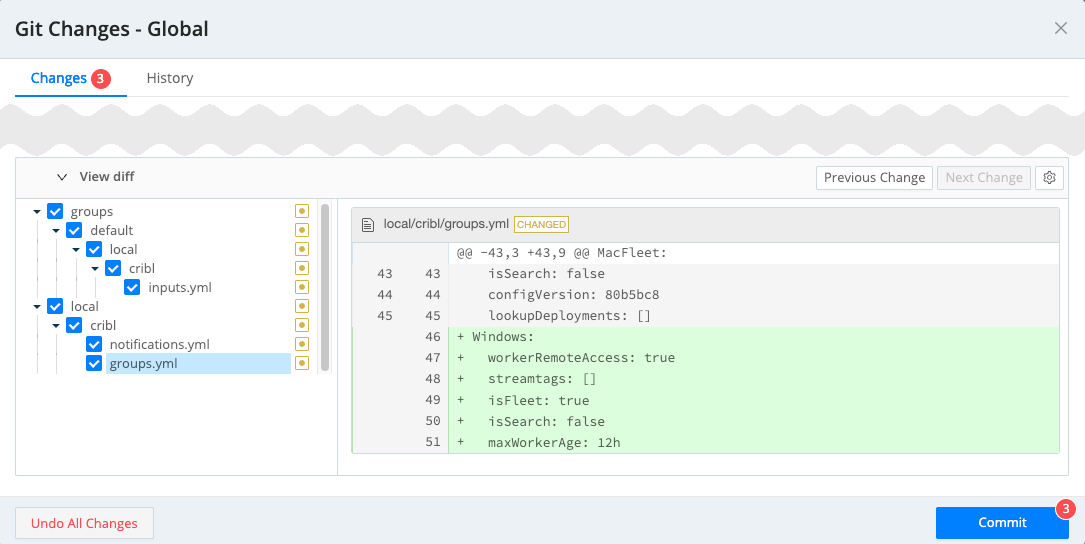
Typically, you do not modify configuration files manually. If you need to edit the configuration outside the UI, Cribl recommends using the API. However, if your particular use case requires it, in an on-prem deployment the files are open for editing.
The Version Control view can also contain entries with configuration files for other Cribl products. See Cribl Search Configuration Files and Cribl Lake Configuration Files for details.
Configuration File Locations
In an on-prem deployment, configuration files are stored in the $CRIBL_HOME/local/cribl directory
(where $CRIBL_HOME is your installation directory, for example, /opt/cribl/).
Configuration for specific Worker Groups is located $CRIBL_HOME/groups/<group-name>/local/cribl.
You can view the default configurations by taking a look in the default directory, instead of local.
Pack configuration resides within a separate subdirectory for each Pack:
$CRIBL_HOME/default/<pack_name>.
General Purpose
| Configuration file/folder | Description |
|---|---|
api-limits.yml | API-related rate limit configuration. |
app-limits.yml | Internal limit configuration. |
appscope.yml | Deprecated legacy instrumentation configuration file. |
breakers.yml | Event Breakers configuration. |
certificates.yml | TLS/SSL certificates. |
conditions | Directory storing configurations for Notification conditions. |
cribl.yml | General system configuration. |
email-templates.yml | Templates for Email Notifications. |
executors | Executor job configurations. |
functions | Directory storing individual Function configurations. |
grok-patterns | Directory storing individual Grok Pattern configurations. |
inputs.yml | Sources configuration. |
instance.yml | Configuration for the current instance. Located in local/_system/instance.yml. |
job-limits.yml | Parameters for Collection jobs and system tasks. |
kms.yml | KMS provider configuration. |
licenses.yml | Licenses. |
limits.yml | Limit configuration. |
logger.yml | Logging levels and redactions. |
notifications.yml | Notifications and Notification targets. |
notification-templates.yml | Templates for email Notifications. |
outputs.yml | Destinations configuration. |
parquet-schemas.yml | Parquet Schemas. |
parquet-schemas | Directory storing individual Parquet Schema configurations. |
parsers.yml | Parsers Library. |
pipelines | Directory storing individual Pipeline configurations. |
protobuf-libraries.yml | Configuration for Protobuf libraries. |
redis-cache-limits.yml | Redis cache settings. |
redis-limits.yml | Redis connection settings. |
regexes.yml | Regex Library. |
route.yml | Route configuration. Located in local/cribl/pipelines/route.yml. |
samples.yml | Metadata about stored sample data files. |
schemas.yml | Schema Library. |
schemas | Directory storing individual schema configurations. |
scripts.yml | Scripts configured at Settings > Global > Scripts. |
secrets.yml | Secrets. |
vars.yml | Variables Library. |
Leader-Specific
| Configuration file/folder | Description |
|---|---|
ai.yml | Cribl AI settings. |
groups.yml | Worker Group and Edge Fleet settings. |
leader.yml | Secondary Leader configuration. |
mappings.yml | Mapping rulesets for Stream Workers. |
messages.yml | Messages displayed in the UI’s Messages fly-out. |
perms.yml | Permission configuration. Located in users/<id>/perms.yml / teams/<id>/perms.yml. |
policies.yml | RBAC Policies. |
roles.yml | RBAC Roles. |
secret-folders/<folder-id>/global-secrets.yml | Global secrets metadata for a specific secret folder. |
secret-folders.yml | Declarations for secret folders that contain global secrets, including backing store and sharing. |
secret-stores.yml | Declarations for secret stores for global secrets. |
service.yml | Service processes. |
Cribl Stream-Specific
| Configuration file/folder | Description |
|---|---|
collectors | Directory storing individual Collector configurations. |
iometrics.yml | Metrics levels for individual Sources and Destinations in Cribl Stream. |
ipfix-information-elements.yml | Predefined IPFIX fields for handling and decoding IPFIX fields from the Cribl Stream NetFlow & IPFIX Source. |
jobs.yml | Collector configuration. |
mdt-devices.yml | Configuration for MDT (Model Driven Telemetry) devices. |
Cribl Guard-Specific
| Configuration file/folder | Description |
|---|---|
sds-rules.yml | Cribl Guard rules. |
sds-rulesets.yml | Cribl Guard rulesets. |
Cribl Outpost-Specific
| Configuration file/folder | Description |
|---|---|
outpost.yml | Configuration for Cribl Outpost. |