





Cribl Stream 4.17.0
| PRODUCT | DATE | RELEASE | ADDITIONAL RESOURCES |
|---|---|---|---|
| Stream | 2026-03-11 | Feature | Known Issues, Cribl Edge Release Notes |
Cribl Stream 4.17.0 includes significant performance improvements, new capabilities, and important bug fixes.
Important Changes
Action Required: End of Life Notice for AWS SDK v2
AWS ended support for their AWS SDK for JavaScript v2 on September 8, 2025. This SDK is used by Cribl AWS Sources and Destinations. To ensure uninterrupted operation and compatibility, we upgraded our SDK to v3 in the September 2025 Cribl release and will completely remove the v2 SDK in May 2026.
What you need to do: Plan to upgrade your Cribl deployment to the latest version by March 2026 to ensure continued compatibility with AWS Services.
Action Required: Deprecation of the Microsoft Message Trace API and Related Source
Microsoft announced a new Microsoft Graph-based Message Trace API in June of 2025 (see this blog post). Because of this new service, the legacy Message Trace support using Reporting Webservice is scheduled to be deprecated on April 8, 2026. The Cribl Message Trace Source uses this legacy API and Cribl users must take action before the deprecation deadline to avoid an outage.
On-prem users:
- If you configured a Message Trace Source in any Cribl Stream version prior to 4.17.0 , you must contact our Support team at support@cribl.io to request extended access beyond the April deprecation to prevent data loss. Microsoft has been working with Cribl and has agreed to extend access for Cribl customers until the end of May. However, you must contact support with your M365 Tenant ID so that you can be included in this extension.
- Additionally, you should plan to upgrade to the latest Cribl version at your earliest convenience so that you can adopt the new Microsoft Source before the legacy model is fully deprecated in May 2026. The new Source is only available in 4.17.0 and later versions.
All users (including cloud and hybrid users):
- Plan to migrate your existing Message Trace Source to the new Microsoft Graph Source after you are upgraded to the 4.17.0 release and before the end of May.
Notice for Leader HA Users
Due to stability and performance improvements, Cribl is increasing our system requirements for Leader High Availability (HA) systems. Beginning with this release, the following is required:
- Make available enough local disk space on the Leader for double the size of your git repository in addition to all your configuration files, plus a 10 GB buffer.
- Ensure your NFS system supports updating
mtime. - If there’s a git timeout configured in the
local/cribl.yml, ensure that it is equal or greater than the system default of 10 minutes. - Consider increasing timeouts for any health checks configured for Leaders. The specific values will depend on your deployment, size of repository, size of the
groupsdirectory, and number of configuration files, but in general we recommend timeouts of 2 minutes for smaller deployments, 5 minutes for deployments with > 50 Worker Groups/Fleets, and 10 minutes for >100 Worker Groups/Fleets.
This guidance is increased in comparison to the values announced in 4.16.0 release notes.
New Features
This release provides the following improvements:
Microsoft Graph Source
Added a new Microsoft Graph Source for Microsoft 365 Message Trace data, providing a replacement for the legacy Office 365 Message Trace Source ahead of Microsoft’s deprecation of the underlying Message Trace REST API and Reporting Web Service.
Send Cloud Identity Event Logs to Cribl Stream on Cribl.Cloud
Cribl.Cloud now supports sending Cloud Identity event logs to HTTP/S (Bulk API) and Raw HTTP/S Sources in Cribl Stream so that the logs can be sent to any Destination (including for SIEM processing).
Support for Datadog Traces
Both the Datadog Agent Source and Datadog Destination now support APM traces so you can ingest and forward high-volume application traces.
New Cribl.Cloud Regions
Cribl.Cloud is now available in four new regions, Paris, Ireland, Tokyo Japan, and Sao Paulo Brazil. Customers may now create Worker Groups in these regions for localized data processing and new organizations can use these regions as their home region.
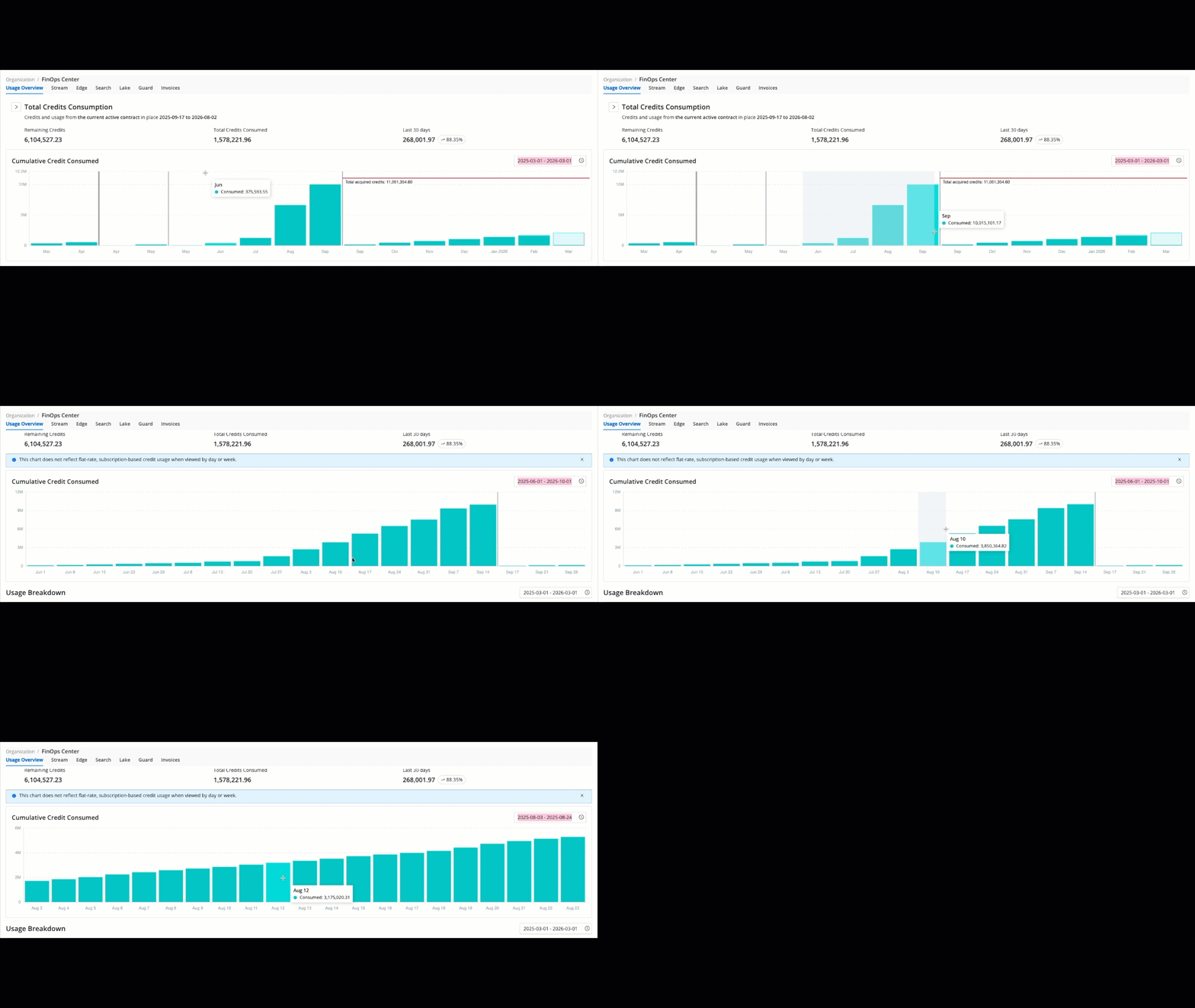
Zoom-in on FinOps Center Bar Graphs
In the FinOps Center, you can now quickly zoom in on any bar graph to view more granular data in a smaller window of time without needing to manually adjust the time filter. Simply click and drag your cursor to zoom in to specific areas of any bar graph.
Detect Sensitive Data Automatically with Cribl Guard Background Detection
Cribl Guard Background Detection adds an AI-driven, always-on layer of defense that continuously samples data in your Pipelines, scans it in the background for new sensitive data patterns (like PII, secrets, and regulated data), and surfaces actionable findings for review. Once Cribl identifies new patterns, you can choose to ignore them or quickly mitigate them with additional Guard rules. This feature is not available in Cribl.Cloud Government.
Custom AI Provider Support: Bring Your Own Model
Cribl now gives organizations the flexibility to Bring Your Own Model (BYOM) by supporting custom AI providers. This offers deeper control over data privacy and compliance, and clearer visibility into AI usage and spend across both Cribl.Cloud and on-prem deployments. This feature allows you to route Cribl AI features through your own managed LLM instead of the default Cribl-managed AI model. You can configure a provider at the Workspace level for Cribl.Cloud or the Global level for on-prem to maintain direct oversight of your AI traffic and existing vendor contracts.
Initial support covers foundational models via OpenAI (Microsoft Foundry) and Anthropic (Amazon Bedrock) for inference, with broader model families and providers planned for future releases. Note that this feature is not currently available in Cribl.Cloud Government. To get started, navigate to AI Settings to enter your provider details and managed API key.
Cribl MCP Server Now Generally Available for On-Prem and Cribl.Cloud
The official Cribl Model Context Protocol (MCP) server is now available for on-prem deployments, enabling AI assistants to interface directly with your Cribl environment. All deployment modes support system metrics, alerts, and viewing Source and Destination configurations. Cribl.Cloud environments unlock additional functionality, including management of Worker Groups and Cribl Lake datasets, as well as full Cribl Search capabilities, such as natural language-to-KQL translation, job results, and Notebook management.
OpenAI Source
Added a new OpenAI Source so you can easily ingest OpenAI model invocation logs and audit logs into your Pipelines for AI usage governance, security auditing, and cost/usage analysis.
Cribl Search Destination
You can now send data from Cribl Stream and Cribl Edge directly to Cribl Search using the new Cribl Search Destination. This Destination is a streamlined version of the Cribl HTTP Destination that automatically targets the local_search endpoint in your Cribl.Cloud Organization and preserves the same behavior for retries, backpressure, and persistent queues.
Experience Improvements
- The sidebar is now more accessible for screen readers and users who rely on their keyboards for navigation. These updates also improve navigation consistency throughout the Cribl suite.
- When you have access to multiple Workspaces in your Cribl.Cloud Organization, you can now switch between them from the top bar in any Cribl product.
- Data samples for Worker Groups can now be managed centrally in the Knowledge Library. All samples are visible, even if they were captured or imported through Packs. You can also share them across Worker Groups in your deployment.
- The System Activity tab charts in Outpost information now show data from the last 24 hours.
- The Outpost table now includes a column for the current Config Version for each Outpost Node. The Outpost Group page now has a Config Version dropdown showing the current and past config versions.
- The Target Version button in the Outpost table now displays a warning icon when that Outpost Group’s target version is older than the Leader version.
- For on-prem deployments using remote Git repositories for configuration version control, we increased the default Git timeout from 5 minutes (
300000ms) to 10 minutes (600000ms). This update reduces the risk of startup failures. It provides time for the initial git fetch to complete, ensuring successful synchronization for large configuration repositories on newly replicated Leader instances.
Sources and Destinations
- The Exec Source has been extended with a Script field that lets you enter a custom script that is sent to the command’s
stdin. - The Appscope Source now shows a deprecation notice in the UI. The Source will be removed in a future release.
- The Amazon S3 Source and Destination region lists now include the AP5 and AP7 AWS regions, allowing you to configure buckets in those regions directly from Cribl.
- The Google Cloud Chronicle API Destination now lets you configure an Endpoint field, so you can point traffic to alternative regional endpoints during outages or special deployments without falling back to generic webhooks.
- Improved the Azure Data Explorer Destination to cache ingestion resource metadata per Worker instead of repeatedly querying the cluster for each Destination in batching mode. This helps to lower the load on Azure Data Explorer data management services, reduce throttling risk, and minimize transient HTTP reset errors during peak ingest.
- Kafka-based Destinations now include the affected topic name in error messages making issues easier to troubleshoot.
- Improved the default behavior of Cribl HTTP Destinations for Edge-to-Stream topologies so that large fleets of Edge Nodes are less likely to overwhelm under-provisioned Worker Groups. Cribl HTTP Out now honors downstream capacity signals and uses safer default retry and backoff settings, reducing the risk of Worker crashes and intermittent errors in high-connection, self-service environments.
- We’ve expanded I/O Observability monitoring to Windows Event Forwarder, HTTP, OpenTelemetry, MSK, Confluent Cloud, and TCP integrations. You can access these metrics through the Internal Cribl Source and view performance charts directly on each Source and Destination’s configuration page for greater visibility into your data pipeline integrations.
- We’ve streamlined the setup for Database Collectors by allowing you to create new Database Connection objects directly within the Collector configuration window. Instead of navigating away to a separate settings page, select Create next to the Connection field to open the New Database Connection modal.
Packs
Connect Packs to Global Sources and Destinations
You can now transfer data in and out of Packs that contain Sources and Destinations:
- Send data from a global Source to a Pack: Route data from a Source that exists at the Fleet level to a Pack containing a Destination.
- Send data from a Pack to a global Destination: Data originating in a Pack can be routed to a Destination that exists outside a Pack.
This new workflow allows you to break down repetitive configurations into modular, reusable components. It allows specialized teams to manage the data processing and output logic for their integration without touching global configurations or impacting other integrations.
Enhanced Pack Monitoring
We’ve expanded our monitoring capabilities to give you full visibility into the internal performance of your Pack’s Routes and Pipelines. The Data > Routes and Data > Pipelines pages allow you to observe the data throughput for each of these resources in your Pack. All metrics use a structured naming convention that prefixes the Pack ID with the Route or Pipeline of interest so that it’s clear where Pack metrics are coming for more accurate troubleshooting.
Pack IDs Must Be Lowercase
Cribl Stream now requires all new Pack IDs to be lowercase. While the Cribl Leader runs on Linux (which is case-sensitive), many Worker Nodes run on Windows or macOS (which are case-insensitive). Previously, it was possible to create two different Packs named MyPack and mypack. However, deploying both Packs to a Remote Node would cause a naming conflict and deployment failure.
From this release onward, Pack IDs must now be entirely lowercase when creating or copying a Pack. The system now validates the uniqueness of a Pack name based on its lowercase string. Your currently installed Packs with uppercase characters will not be renamed or broken. They will continue to function as they do today. However, we recommend migrating them to lowercase IDs to ensure future compatibility across all platforms.
Corrections
This release contains the following bug fixes:
Operational Fixes
| ID | Description |
|---|---|
CRIBL-34884 | We fixed the functionality of the audit log by adding a packId field to log entries. When you create, update, or delete resources within a Pack (such as Routes and Pipelines), the audit log now explicitly identifies the specific Pack where the change occurred. This makes it easier to track and audit configuration changes across your entire environment. |
| CRIBL-34521 | We resolved an issue where cloning a Worker Group could cause new Workers to fail their initial configuration pull. This was caused by an incorrect version ID being assigned at the moment of cloning, which generated unnecessary log errors. The cloning process now correctly handles versioning, ensuring that new Worker Groups remain in a clean state until their first official deployment. |
| CRIBL-36834 | We resolved a UI issue in the Job Inspector where the Earliest and Latest times appeared to be an hour off for jobs that were scheduled across Daylight Saving Time (DST) transitions. The Job Inspector now accurately accounts for DST offsets when using absolute time ranges, ensuring the displayed job run times consistently match the expected times. |
| CRIBL-38270 | We resolved a regression in version 4.16.0 where triggered Notifications were not appearing in the Monitoring > Notifications dashboard. The underlying UI error has been corrected, and the Notifications tab now accurately displays all active and historical alerts as expected. |
| CRIBL-38219 | The Outpost Group table now displays a column for the tags added to the group. |
| CRIBL-37833 | Attempting to move an Outpost that can’t be moved due to defined environment variables now displays a clearer error message. |
| CRIBL-36500 | The Outpost table now displays a warning icon when an Outpost Node is running a version older than the Leader. |
| CRIBL-38495 | Fixed an issue where Outpost Groups would only allow selecting Leader TLS certificates in the UI instead of their own. |
| CRIBL-37732 | We resolved an issue where QuickConnect allowed users to save duplicate connections between the same Source and the same Pipeline, Pack, or Destination. Previously, if a user accidentally created a second duplicate connection, it could result in redundant data processing and unexpected spikes in license consumption. The UI now enforces unique connections, displaying an error and preventing saves if there are duplicates. |
| CRIBL-37528 | We resolved an issue where the internal system tasks used to fetch Worker Group logs would incorrectly report a canceled or failure status in the Job Inspector, which could lead to confusion when debugging. These background tasks now report their status accurately, ensuring that the system jobs list reflects the true health of your environment. |
| CRIBL-35455 | We resolved an issue where hitting the Return key on a confirmation modal (such as when deleting a Pipeline Function) could cause the browser to freeze. This behavior was primarily observed in Chromium-based browsers such as Arc, Opera, and Microsoft Edge. The confirmation logic has been updated to handle keyboard inputs correctly across all supported browsers. |
| CRIBL-38581 | We fixed an issue in the UI that caused pages to fail to load, showing a “no such file or directory” error on pages such as the REST Collectors list. We have updated the UI so that if the system encounters an error while retrieving your UI preferences, it will now default to a clean state instead of blocking the page from rendering. |
| CRIBL-38552 | We resolved an issue with license synchronization after high availability failover. This could lead to incorrect expiration warnings or quota limits in the UI after a transition to a standby Leader. The standby Leader now automatically reloads all licensing information from the shared failover volume the moment it becomes the primary Leader, ensuring your licensing status is always accurate and up to date. |
| CRIBL-37777 | The C.WorkerGroupId variable now correctly evaluates within Packs. Previously, this variable would return an empty string when referenced inside a Pack’s Pipeline. This fix ensures consistent access to Worker Group metadata in Packs. |
| PLAT-433 | We fixed an issue that caused incorrect Team and Role mapping for Azure Active Directory (Azure AD) LDAP groups with names that contain spaces. |
Source and Destination Fixes
| ID | Description |
|---|---|
CRIBL-37928 | Resolved an issue where the File Monitor would run out of memory and restart when attempting to discover a directory with a large number of files in Manual discovery mode. |
| CRIBL-38140 | Updated predefined File Monitor Sources: in_file_auto and in_file_varlog to correctly collect from the end of files by default. |
| CRIBL-37521 | Ensured that binary files like lastlog are not collected by the File Monitor when Enable binary files is toggled on. |
| CRIBL-25674 | Fixed an issue in the Splunk Single Instance and Splunk Load Balanced Destinations where very long authentication tokens caused a buffer error, preventing Workers from sending data to Splunk indexers. The Destinations now validate header size and handle long tokens without interrupting data delivery. |
| CRIBL-32736 | Fixed an issue where metrics generated by the Publish Metrics Function could fail to send after upgrading to 4.11.1, causing Splunk Load Balanced Destinations to log The string argument must be of type string or an instance of Buffer or ArrayBuffer. Received type number (...) and drop metrics. The function now correctly handles numeric metric fields so metrics are delivered as expected. |
| CRIBL-36451 | Fixed an issue where the Azure Data Explorer Destination using Parquet format could leave orphaned .parquet files in the staging directory after upload failures and retries, causing unnecessary disk growth and raising data-durability concerns. The Destination now reliably cleans up staging files once data is successfully ingested, even when recovering from error mode. |
| CRIBL-37889 | Fixed an issue with the Splunk HEC token API where requests that omitted allowedIndexesAtToken caused new tokens to be written with a null value, preventing Splunk HEC Sources from initializing after commit and deploy. The API now correctly handles missing allowedIndexesAtToken values so Sources start as expected. |
| CRIBL-38102 | Fixed an issue in 4.16.0 where enabling the Event Hubs Minimize duplicates option caused partition lookups to fail with Cannot read properties of undefined (reading 'fetchPartitions'), forcing the Source to default to starting consumers on all partitions. The option now initializes correctly and evaluates Event Hubs partitions as intended, preventing redundant consumption errors in production environments. |
SDK Changelogs
The Cribl SDKs help you integrate with Cribl and reduce the need for repetitive tasks. We maintain changelogs for each version of the Cribl SDKs in their GitHub repositories:
- Go SDK changelogs: control plane and management plane
- Python SDK changelogs: control plane and management plane
- Typescript SDK changelogs: control plane and management plane