


Create and Manage Authentication Tokens
Authentication tokens are issued by the Leader Node to control and secure communication between the Leader, Outpost Nodes, Workers, and Edge Nodes.
Types of Authentication Tokens
The following token types are available:
Provisioning tokens are the fundamental way to deploy new Stream Workers, Edge Nodes, and Outposts, and connect them to the Leader Node.
You can later manage, rotate, and revoke provisioning tokens and track their usage in the UI.
Environment tokens are authentication tokens you use for programmatic deployments where you manage tokens outside Cribl.
Environment tokens have limited management capabilities and UI visibility.
Authentication Tokens in New Deployments
New on-prem Cribl Stream deployments include no built-in provisioning tokens. You need to create a token to connect any hybrid Stream Workers, Edge Nodes, or Outposts to the Leader.
Cribl.Cloud deployments handle tokens for Cribl-managed Worker Groups in Cribl Stream automatically. However, you still need to create tokens for authenticating Outpost Nodes, Edge Nodes, and Workers in customer-managed (hybrid) Worker Groups.
Authentication Tokens in Upgraded Deployments
Cribl Stream deployments created on versions older than 4.20 used a different authentication token mechanism. On upgrade to 4.20, those deployments will automatically receive one legacy type token set to the value of the existing auth token.
Cribl recommends rotating the legacy token to a new provisioning token at your earliest convenience.
Create a New Provisioning Token
To create a new provisioning token:
In the sidebar, select Settings, then select Global.
Select Security, then Provisioning Tokens.
Select Create Token.
Enter a Token ID. Once the token is created, you can’t change this ID.
Optionally, enter a Description that will help identify the proper token to use.
Confirm with Create Token.
You will be shown the newly created token. Copy it and save it in a secure place. You can also select Download to download the token as a text file.
The token will not be shown again.
Confirm with Close.
You can now use this token when creating a new Worker Node, for example, by inputting it in the Add/Update Worker Node modal.
Monitor Token Usage and Health
The list of tokens in Settings > Global > Security > Provisioning Tokens shows all existing provisioning tokens.
Each provisioning token has a status:
- Active - can be used for connecting Stream Workers, Edge Nodes, and Outposts.
- Revoked - has been revoked and can no longer be used by Nodes. Existing Nodes will remain connected until their next restart.
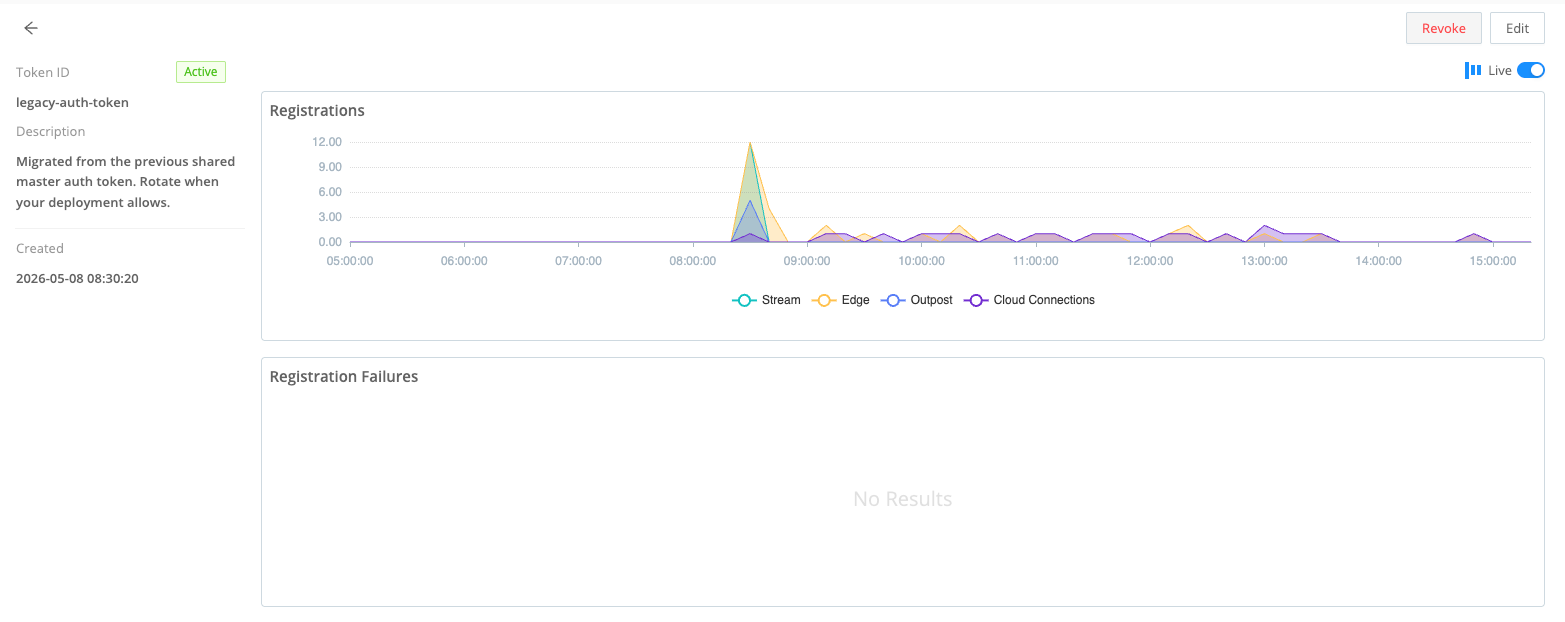
Select a token to see its details. This screen also shows you charts visualizing the number of Worker Nodes, Edge Nodes, Outposts, and Cloud Connections using this token, and the number of failed Node registrations.
Rotate a Token
Rotating lets you switch Worker Nodes to use a different token. In this way you can also replace an environment token used by a Node with a provisioning token.
To rotate a token for a selection of Worker Nodes:
- On the top bar, select Products, then Stream, then Worker Nodes.
- Select the Worker Nodes you want to rotate the token for.
- Select Rotate Token.
- In Token ID, select the token you want to rotate to.
- Confirm with Rotate and Restart, or Rotate if you want to restart the Worker Nodes manually.
You must restart Worker Nodes after rotating for them to switch to connecting via the new token.
Revoke a Token
You can revoke a provisioning token to stop any Worker Nodes that use it from connecting to the Leader.
You can’t revoke the legacy token in a Cribl.Cloud deployment.
To revoke a token:
In the sidebar, select Settings, then select Global.
Select Security, then Provisioning Tokens.
Select the token you want to revoke.
Select Revoke. You will see a modal asking for confirmation. Type
REVOKEto confirm.You can’t undo revoking a token.
Confirm with Revoke Token.
Restart the Worker Nodes you revoked the token for.
Token revocation will come into force only after you restart the Worker Nodes.
Environment Tokens
You can use environment tokens as a supplementary way of authenticating Nodes to the Leader without creating a provisioning token. Use this method of providing tokens to Nodes when you plan to manage tokens via your own infrastructure outside of Cribl.
An environment token is a string passed to the Leader Node in the CRIBL_DIST_AUTH_TOKENS environment variable.
The variable can contain multiple comma-separated token strings to facilitate token rotation.
Tokens listed in this variable will be accepted when used by a Worker, Edge, or Outpost Node
(for example in instance.yml config or in a Node’s CRIBL_DIST_LEADER_URL environment variable).
See Docker Deployment for example configurations
that inject an auth token into a Node via this environment variable.
Cribl recommends that each token string contains at least 14 characters and includes uppercase letters, lowercase letters, and numbers.
Environment tokens will not be visible and you cannot monitor, rotate, and revoke them in the UI like provisioning tokens.
If a Node is deployed using an environment token, you can switch it to a provisioning token once it connects to the Leader. To do this, rotate the token for this Node.