





Secure Leader-Worker Communication with TLS
Secure the communication between Leader Node, Outposts, and Workers/Edge Nodes with TLS.
You can use TLS to secure communication between the Leader Node, Outpost Nodes, and Workers/Edge Nodes.
In Leader-Node communication, Leader serves as the TLS server, and Nodes, whether Outposts, Edge Nodes or Workers, act as the client. When securing communication between an Outpost and a Worker/Edge Node, Outpost is the server, while the Worker/Edge Node is the client.
The recommended order of steps when configuring such TLS settings is to configure the Leader Node, then optionally configure Outposts, and finally, enable TLS on all Workers and Edge Nodes.
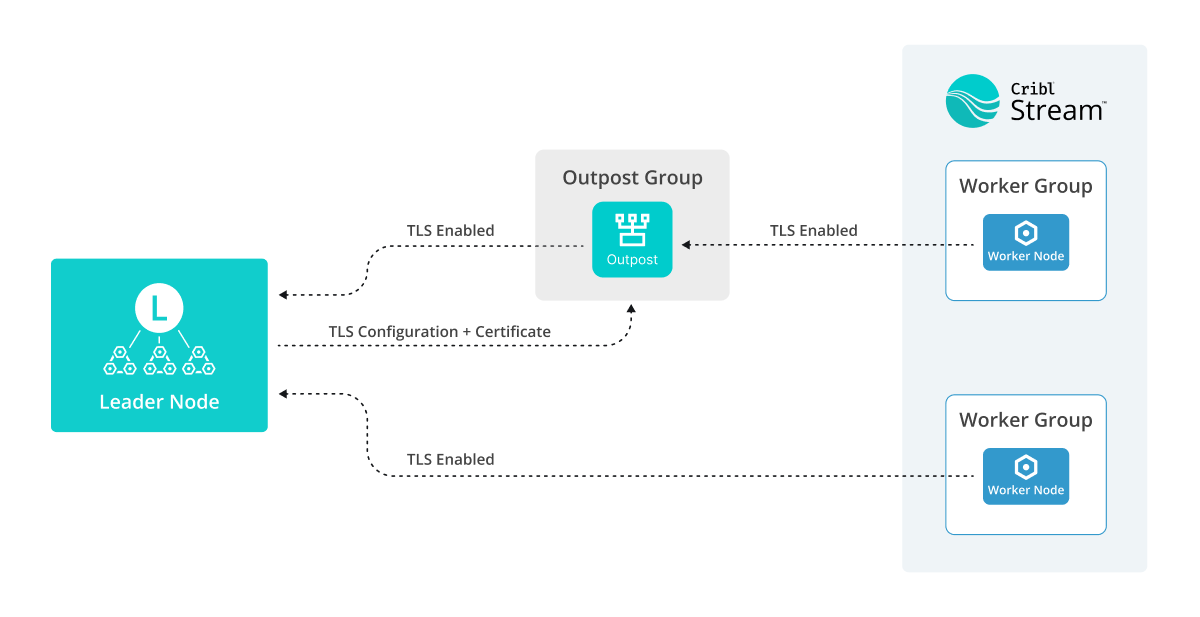
The Leader distributes TLS configurations and certificates to Outposts, Workers, and Edge Nodes. Outposts use them to configure the Outpost listener, and Worker and Edge Nodes for their API interfaces. These certificates are also used for secure connections with Sources and Destinations.
Each Worker, Edge Node, or Outpost must have TLS settings configured locally for communications to the Leader.
Configure TLS on the Leader Node
In Cribl.Cloud, TLS is enabled and configured for you by default for Leader-Node communication. TLS is also enabled by default on Stream Workers in Cribl-managed Worker Groups.
In an on-prem deployment, you need to manually enable and configure TLS on the Leader Node.
- On the Leader Node, add a certificate that will secure the TLS connection. See Add a Certificate for more information.
- Enable TLS. Select Settings > Global > System > Distributed Settings > TLS Settings and toggle Enable Server TLS on.
- In Server Certificate, select a certificate in the Certificate drop-down, or enter Certificate path and Private key path manually.
- Confirm with Save.
If you have existing Stream Workers, Edge Nodes, or Outposts connected to the Leader, they will disconnect at this point, until you configure them to use TLS as well.
Configure Leader-Outpost TLS Communication
If you use an Outpost to relay control plane communications between the Leader Node and Worker Nodes, secure it by enabling TLS for the Outpost Group.
TLS must be enabled for an Outpost Node to connect to a Leader in Cribl.Cloud.
If the Leader Node has TLS enabled and configured, new Outpost Nodes you create using the bootstrap script will automatically use TLS to connect to it. If you create Outpost Nodes via direct download, or if you enable TLS on a Leader that already connects to Outposts, you must update the configuration for each Outpost to use TLS.
Enable Outpost TLS with Bootstrap Script
To enable TLS on an existing Outpost Node using the bootstrap script, run the Update version of the script. The script will automatically establish a TLS connection with the Leader.
Enable Outpost TLS with a CLI Command
To enable TLS connection on an existing Outpost Node with the mode-outpost command,
pass the -S 1 parameter to the command.
The CLI commands reset all the Outpost Node information,
so you need to pass all the parameters to the command, not only -S.
Configure Outpost-Worker Node TLS Communication
To configure TLS for communication between an Outpost and Worker Nodes, enable TLS per Outpost Group:
- In the sidebar, select Outposts, then select the Outpost Group you want to configure.
- Select Settings.
- Under Distributed Settings > TLS Settings, toggle Enabled on.
- In Server Certificate, provide the Certificate, or Private key path and Certificate path as needed.
- Select Save, then commit and deploy the changes.
If you have existing Stream Workers or Edge Nodes connected through the Outpost, they will disconnect at this point, until you configure them to use TLS as well.
Configure TLS on Worker Nodes
If the Leader or Outpost Node has TLS enabled and configured, new Worker Nodes you create using the bootstrap script will automatically use TLS to connect to it. If you create Worker Nodes with any other method, or if you enable TLS on a Leader/Outpost that already connects to Worker Nodes, you must update the configuration for each Worker Node to use TLS.
TLS must be enabled for a Worker Node to connect to a Leader in Cribl.Cloud.
If the Leader Node uses a certificate issued by a certificate authority (CA) that the Worker Node doesn’t trust,
provide the Worker Node with a CA certificate so it can validate the Leader’s certificate.
Do it by configuring the CRIBL_DIST_LEADER_URL environment variable with tls.caPath or providing the path directly to the NODE_EXTRA_CA_CERTS variable.
Enable Worker Node TLS with Bootstrap Script
To enable TLS on an existing Worker Node using the bootstrap script, run the Update version of the script. The script will automatically establish a TLS connection with the Leader.
Alternatively, you can enable TLS on the Worker Node:
- Via CLI commands.
- In the UI.
- In the
instance.ymlfile. - With an environment variable.
Enable Worker Node TLS with a CLI Command
To enable TLS connection with the mode-worker command, pass the -S 1 parameter to the command.
The CLI commands reset all the Worker Node information,
so you need to pass all the parameters to the command, not only -S.
Enable Worker Node TLS in the UI
To enable TLS connection on a Worker Node via the UI, navigate to the Worker Node’s Worker Settings > System > Distributed Settings > TLS Settings, and toggle Enable Server TLS on.
You do not need to fill in any other settings in this page to connect the Worker Node to the Leader.
Enable Worker Node TLS in the instance.yml File
To enable TLS connection in the instance.yml file, set distributed.master.tls.disabled to false.
Enable Worker Node TLS with an Environment Variable
You can enable TLS connection by using the CRIBL_DIST_LEADER_URL environment variable, by replacing the tls:// scheme instead of tcp://.